

Your phone holds thousands of photos, and most of them stay trapped behind glass. A cell phone printer pulls them out, gives them a body you can hold, hand over, or stick on a fridge. Travelers, scrapbookers, parents, and party hosts all reach for the same thing: a small wireless printer that turns a digital favorite into a physical keepsake in under a minute.
The category splits cleanly into two camps. Pocket printers use Zink or instant film for 2×3-inch credit-card prints, perfect for stickers and journals. Slightly larger desktop photo printers use dye-sublimation to deliver 4×6-inch keepsakes with richer detail. The nine picks below cover both styles so you can match the right tool to your real-world routine.
The Shortlist At A Glance

FUJIFILM Instax Mini Link 3 Cell Phone Printer – Sage Green

KODAK Step Instant Smartphone Photo Printer (Pink)

KODAK Step Instant Photo Printer (Blue)

Phomemo Inkless Portable Printer for Travel
HPRT CP4100 4×6 Photo Printer

HPRT 4×6 Photo Printer (Beige)
iDPRT 4×6” Photo Printer

KODAK Step Instant Smartphone Photo Printer (White)

HPRT Photo Printer 4×6
The Picks, Examined More Closely
The Instax Mini Link 3 leans into the social side of phone photography. It pairs over Bluetooth, then drives the dedicated app where you arrange collages, add doodles, and pull frames from short video clips. The Sage Green finish has a textured feel that resists fingerprints on a busy night out.
Prints come out at credit-card size on Instax Mini film, which costs more per shot than Zink paper but delivers that unmistakable instant-film look with deeper contrast. For party hosts and scrapbookers who care about how a print looks in hand more than how cheap each one is, the trade is usually worth it.
Advantages To Know
- App includes creative frames, collage layouts, and video-frame extraction
- Compact body fits in a jacket pocket or small crossbody bag
- LED indicators on the body for quick status checks without opening the app
- Print quality carries instant-film warmth that Zink prints lack
- Multi-print mode lets you hand out duplicates at gatherings
Things To Consider
- Film packs cost more per print than Zink alternatives
- Battery life drains quickly when printing back-to-back at events
Key Specs
Who It Suits Best
Social creatives who want playful prints at parties and gatherings.
Where Another Pick Suits Better
For sticky-backed journaling on a tighter recurring budget, the KODAK Step Instant Smartphone Photo Printer (Pink) prints cheaper per page.
The KODAK Step in Pink is the cheerful cousin of the pocket-printer family. It uses Zink paper (a no-ink stock with dye crystals embedded inside) and pairs over Bluetooth to iOS and Android phones. Each 2×3-inch print has a sticky back you peel and slap onto a laptop lid, notebook, or travel journal.
The accompanying app handles simple edits, filters, and frame overlays. Where it differs from the Instax above is the print feel: Zink photos come out closer to a polished sticker than a vintage Polaroid, which most scrapbookers actually prefer for daily use.
Points In Its Favor
- Zink paper means no ink cartridges to replace or swap
- Compact body slides into a back pocket or small crossbody bag
- Sticky backing turns every print into an instant sticker
- App supports basic editing and filter tweaks
Worth Noting
- Zink prints can look slightly flatter than dye-sublimation alternatives
- Photo paper refills are proprietary and add up over months of heavy use
- Color accuracy varies in low-light phone shots
Made For
Journalers and scrapbookers who want a low-fuss sticker printer on the go.
Consider Something Else When
Those chasing the warm film look of an analog print should pick the FUJIFILM Instax Mini Link 3 instead.
This Blue version of the KODAK Step shares its bones with the Pink model above, just dressed in a different shell. The blue finish reads more casual than candy-bright, which some shoppers find easier to live with day after day on a desk or kitchen counter.
The mechanics stay identical: Zink 2×3-inch prints, Bluetooth pairing, and a companion app for editing. If you love the feature list but not the louder colors, this is the same printer in a calmer wardrobe.
Strong Points
- No-ink Zink paper keeps the routine cartridge-free
- Sticky-back prints ready for journals, fridges, and lockers
- Bluetooth setup works smoothly on both iOS and Android
- Under 60-second prints keep the experience snappy
- Subtle blue finish blends with most home decor
Trade Offs
- Zink prints lean cooler and flatter than dye-sublimation alternatives
- Proprietary paper limits your refills
Key Specs
Right Fit For
Daily casual phone printing in a home where a bright pink shell feels out of place.
Skip It When
For richer 4×6 keepsakes, the HPRT CP4100 is the better step up in print quality.
The Phomemo M08F sits in a different lane than the rest of this list. It is not a photo printer in the traditional sense. Instead, it uses thermal printing (heat-activated paper, no toner required) to handle documents, notes, labels, and reference pages up to letter format (8.5 x 11 inches).
At roughly 1.5 pounds and 1.5 inches thick, it slips into a carry-on or laptop sleeve without the camera. Road warriors print boarding passes, contracts, and study notes straight from a phone or laptop over Bluetooth.
What It Does Well
- No ink or toner means zero cartridge costs over its lifetime
- Letter-size output handles full pages, not just wallet notes
- Includes a carry case for travel-ready protection
- Pairs with phones and laptops through the Phomemo app
Points To Note
- Thermal output is monochrome, so color photos are not its strong suit
- Requires the Phomemo app for Bluetooth pairing, which adds a setup step
- Thermal paper is a specialty refill, not standard office stock
Key Specs
Best Suited To
Mobile professionals and travelers who print documents, not photos, on the road.
Look Elsewhere When
For vivid color photos from your phone, the KODAK Step series is a closer match to your needs.
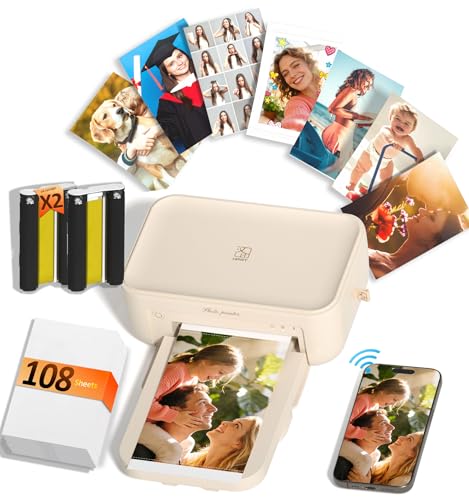
The HPRT CP4100 is where this list pivots from sticker prints to archival keepsakes. It uses dye-sublimation (a heat-driven process that layers color onto paper) at 300 dpi, which produces smooth gradients and natural skin tones that Zink printers struggle to match.
The box includes 108 sheets of photo paper and two ribbons, so a new owner can print right out of the gate. A built-in lamination layer seals each print against water, scratches, and fading, which is why families lean on it for baby albums and wedding photos.
Features That Help
- Dye-sublimation output with a laminated protective finish
- 300 dpi resolution handles fine detail in faces and landscapes
- Wi-Fi pairing skips cables and works from most phones
- Bundled paper and ribbons cover the first hundred prints
- Compact desktop footprint fits on a bookshelf or small side table
Honest Caveats
- Slower than pocket printers since each print passes through multiple color passes
- Ribbon refills are specific to the CP4100, limiting cross-brand use
- Not designed for travel or on-the-go printing
Feature Snapshot
Who Will Love This
Family archivists and gift-makers who want prints that survive handling and time.
Reach For A Different Pick When
For a similar 4×6 result in a softer home-friendly finish, the HPRT 4×6 Photo Printer (Beige) makes more sense.
The Beige HPRT 4×6 takes the same dye-sublimation engine as the CP4100 and dresses it in a softer shell that disappears into a living room or nursery. The cream tone reads warmer on a shelf than black or white tech, which matters for shoppers who keep gear in open sight.
Wi-Fi handles the wireless side, and the bundled 108-sheet, 2-ribbon starter kit mirrors the CP4100. The honest read is that this is the same core printer in a friendlier color, with print quality and speed that match its sibling closely.
Real Benefits
- Same 300 dpi dye-sublimation output as the CP4100
- Soft beige finish blends with warm home interiors
- Wi-Fi connection keeps cables off the desk
- Auto-lamination protects each print as it exits
Less Ideal Details
- Beige finish shows dust more than darker shells in a busy room
- Still slower than instant Zink pocket printers
The Right Fit
Living-room and nursery use where a quieter-looking printer matters as much as the photo itself.
Another Choice May Suit
Travelers and party hosts will find the FUJIFILM Instax Mini Link 3 far easier to carry around.
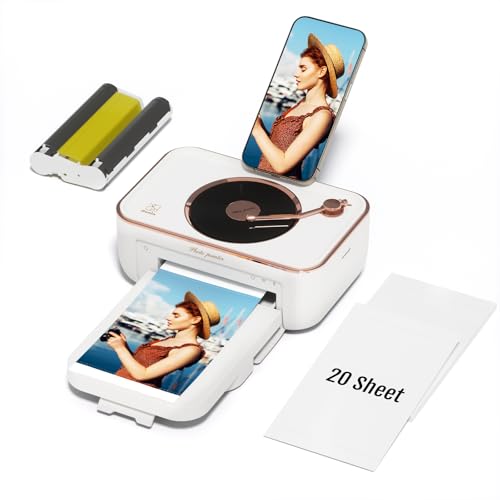
The iDPRT 4×6 lands as a friendly entry point for first-time desktop photo shoppers. The streamlined body breaks down quickly, the assembly process leans toward intuitive, and the smaller starter bundle (20 sheets plus one cartridge) keeps the upfront cost approachable.
It uses dye-sublimation like the HPRT models, which means the laminated, fade-resistant output stays a strength. The trade-off shows up in bundle size: a serious printer will chew through 20 sheets in an afternoon, so most owners reorder supplies within weeks.
Where It Excels
- Lower upfront cost thanks to the smaller starter bundle
- Modular design makes setup and paper changes straightforward
- Dye-sublimation output keeps prints vivid and protected
- Compact desktop size fits in tight home-office corners
Potential Drawbacks
- Only 20 sheets included means reordering supplies almost immediately
- Slower print cycle than pocket Zink options
- Less bundled paper than HPRT’s 108-sheet kits
Feature Card
Perfect Match For
First-time desktop photo shoppers who want a low-commitment entry point.
Where A Sibling Pick Shines
For heavy monthly printing, the HPRT CP4100 ships with enough paper to keep you busy for a while.
The White KODAK Step is the calmest colorway in this pocket-printer family. It pairs the same Zink 2×3-inch sticky-back prints and Bluetooth setup as its Pink and Blue siblings, just in a clean white shell that feels giftable and minimalist.
Owners who carry tech in white leather bags or neutral tote bags tend to gravitate here. Performance matches the rest of the Step lineup, so the choice really comes down to aesthetics and how loud you want the printer to look on a shelf.
Useful Strengths
- Clean white finish works as a thoughtful gift option
- Zink paper keeps the routine cartridge-free
- Sticky-back prints simplify journal and planner use
- Pocketable body slips into small bags for travel
A Few Limitations
- White shell scuffs visibly in a backpack or shared tote
- Same proprietary paper dependency as other Step models
Built With In Mind
Minimalists and gift-givers who want a printer that looks at home in any space.
Swap It Out When
Travelers needing letter-size document printing should reach for the Phomemo Inkless Portable Printer instead.
This HPRT 4×6 rounds out the list as the workhorse for batch printing. The 108-sheet, 2-ribbon bundle mirrors the CP4100, which means a wedding photographer, party host, or busy parent can churn through a hundred prints before reordering.
Dye-sublimation delivers the same protected, laminated output you get from the other HPRT models. The honest read is that this printer is identical in print quality to its siblings, but its high-volume bundle makes it the smarter pick for event-heavy households.
What Helps Most
- 108-sheet bundle supports big-batch event printing
- Dye-sublimation output with protective lamination
- Wi-Fi connection keeps the workspace cable-light
- Compact size fits on a side table or shared counter
Where It May Fall Short
- White shell needs more frequent wiping in busy homes
- Ribbon refills tie you to the HPRT consumable line
- Print cycle is slower than instant pocket printers
Whose Shelf It Belongs On
Event hosts and batch printers who burn through dozens of photos in a single weekend.
Not Your Match When
For a one-off occasional print session, the iDPRT 4×6” Photo Printer’s smaller bundle feels less wasteful.
Matching The Right Printer To Your Routine
Print size is the first fork in the road. Pocket printers like the KODAK Step series and the Instax Mini Link 3 output 2×3-inch prints that fit journals, lockers, and laptops, while 4×6 printers like the HPRT and iDPRT models output standard photo size for frames and albums. Travelers tend to want the smaller format for portability, while families archiving milestones lean toward 4×6 keepsakes.
Print technology shapes the look and feel of every shot. Zink paper embeds dye directly into the stock, so there is no ink to spill and no cartridge to swap, though colors lean slightly cooler. Dye-sublimation layers color through heat and finishes with a laminate coat that resists water and fading. Instant film, like in the Instax, carries a warmer analog look that pocket printers using Zink cannot match.
Connectivity matters more than most shoppers expect. Most picks pair over Bluetooth through a companion app, which means updates and new features arrive quietly over time. Phomemo’s M08F also adds laptop support for document printing on the road. Wi-Fi options, like the HPRT desktop models, skip the cable but still rely on an app for edits and printer management.
Running cost is the silent decider. Zink paper and instant film both run higher per print than standard office paper, so a heavy monthly user will feel the refills more than a casual one. A bundled 108-sheet kit, like the HPRT models include, softens the first month of ownership but does not eliminate ongoing supply costs. Match the bundle size to how often you actually plan to print.
Things Worth Knowing Before You Click
Mistakes Worth Dodging
Buying a pocket printer when you really want framed photos leaves you with hundreds of prints that never make it off the fridge. Likewise, picking a 4×6 desktop model for a night out means lugging a heavy box to the party. Match the format to the destination, not the spec sheet.
Another trap is ignoring the consumable ecosystem. Every printer here depends on proprietary paper, film, or ribbons. Before committing, confirm that refills are easy to find and that the cost per print fits a realistic monthly habit.
When Paying More Pays Off
The step up to dye-sublimation costs more upfront but pays back in print longevity. Laminated 4×6 prints survive kids, water glasses, and travel scrapbooks without fading, while Zink prints in those same environments tend to show wear within months. Higher-tier models also bundle more paper, which spreads the cost across a longer first ownership cycle.
Frequently Asked Questions
What is the difference between Zink and dye-sublimation prints?
Zink uses paper with embedded dye crystals that activate under heat, producing no-ink prints that are slightly cooler in tone. Dye-sublimation layers color through heat and finishes with a laminate coat that resists water and fading.
Do these printers need ink cartridges?
Zink and instant-film printers need no cartridges at all. Dye-sublimation printers use ribbon cartridges that handle hundreds of prints before replacement.
Can I print from both iPhone and Android phones?
Yes, every pick in this list pairs with both iOS and Android through its companion app. The Phomemo M08F also extends pairing to laptops for document printing.
How long does a print take from tap to photo?
Most pocket printers finish a 2×3 print in under a minute. Dye-sublimation 4×6 printers take a bit longer because each print passes through multiple color layers.
Are these prints archival quality?
Dye-sublimation prints with laminate coating come closest to archival longevity. Zink and instant-film prints handle daily handling well but will show wear faster in high-traffic environments.
Closing Remarks
The right cell phone printer matches the prints you dream of handing over. Pocket Zink and Instax models fit spontaneous nights and journal sessions, while desktop dye-sublimation models handle albums and gifts meant to last. Pick the size, technology, and bundle that match your real habit, and the rest takes care of itself.


