

Picking a tablet for a kid rarely goes the way you plan. One minute you’re searching for something tough enough to survive a backpack drop, the next you’re worried about screen time, app safety, and whether a 7-year-old can actually hold the thing without dropping it on a hardwood floor. The right tablet quietly handles all of that.
This lineup mixes rugged toddler-first designs with slimmer options an older child or tween can carry to school. A few even double as family devices when homework’s done. Skip the guesswork and start with what fits your child’s age, grip, and curiosity.
A Closer Look At The Lineup

SAMSUNG Galaxy Tab S6 Lite 10.4″ 64GB WiFi Android Tablet (Oxford Gray)

SVITOO Kids Tablet 10 Inch, Android 16 Tablet, 20GB RAM, 32GB Storage

Samsung Galaxy Tab S10 FE 128GB WiFi Android Tablet, US Version (Blue)

COLORROOM 2026 Android 16 Tablet 11 Inch, 18W Fast Charge (Blue)
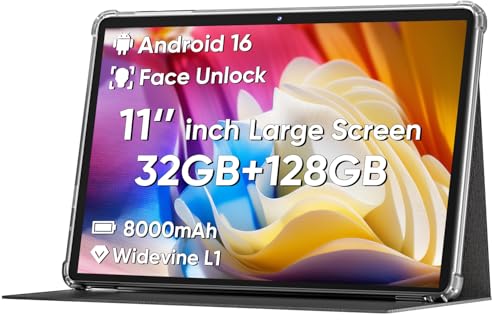
COLORROOM 2026 Android 16 Tablet 11 Inch, 18W Fast Charging (Black)

Trayoo Kids Tablet, 7 Inch Toddler Tablet with 32GB ROM and Shockproof Case
What Each Pick Brings To The Table
When a tablet needs to feel grown-up without costing like one, the Galaxy Tab S6 Lite lands in a sweet spot. Its slim metal body, included S Pen, and dual speakers make it equally useful for a tween’s art project and a Friday-night movie on the couch. Compared with the COLORROOM tablets further down, this one trades extra screen real estate for a more refined build that older hands actually want to hold.
The included S Pen skips batteries, docks neatly into the body, and turns the screen into a notebook for sketching, math practice, or handwriting drills. Samsung also offers an optional care plan for accidental drops and cracked screens, which matters in a house where the device gets passed around. For most families with kids roughly 9 and up, this is the everyday workhorse that doesn’t feel like a “kids tablet.”
The Case For It
- Slim metal chassis feels durable without being heavy in a backpack.
- S Pen opens up note-taking, drawing, and PDF markup for schoolwork.
- Dual speakers are good enough for shared movie nights in a quiet room.
- Optional Samsung Care+ covers drops, spills, and screen cracks, a real plus with kids around.
- 10.4-inch display balances movie-watching with everyday portability.
Things To Consider
- No rugged case in the box, so a third-party bumper is wise for younger users.
- Glossy finish shows fingerprints quickly under classroom lighting.
- WiFi-only here, so no cellular backup on the school commute.
Who It Suits Best
Older kids and tweens who want a “real” tablet for school, drawing, and streaming, with parents who’d rather not buy a second device in two years.
Look Elsewhere When
Your household needs a smaller, kid-proof design for a toddler, where the Trayoo Kids Tablet is a better fit.
Designed specifically with younger users in mind, the SVITOO 10-inch kids tablet pairs Android 16 with parental controls and a bundled protective case. Where the Galaxy Tab S6 Lite feels like a grown-up tablet that tolerates kids, this one is the opposite: a kid-first machine that quietly does grown-up jobs too. The gift-ready box also makes it useful for birthdays and holidays when you want to hand something over without wrapping it first.
Inside, 20GB of RAM keeps apps responsive when a child jumps between a learning game, a video call, and a drawing app. Android 16 is current, which means better long-term app compatibility than older kid tablets still running dated Android versions. The case that ships with the unit adds grip and shock absorption, so you don’t need to buy a separate bumper on day one.
What Earns Its Place
- Protective case included, so drop protection starts the moment you unbox it.
- Android 16 gives the device a longer runway for current learning apps.
- 20GB RAM handles background tasks better than older kid tablets with 4GB or less.
- Gift-ready packaging saves a trip for wrapping paper.
Points To Note
- 32GB of internal storage fills up quickly with offline videos and apps.
- The included case adds bulk that may frustrate smaller hands.
Right Fit For
School-age children who want a bigger screen than a 7-inch tablet but still need locked-down parental controls in a family-shared space.
Consider Something Else When
You want more internal room for offline school downloads, where the COLORROOM 11-inch tablets offer noticeably larger storage.
The Galaxy Tab S10 FE is the tablet you hand to a teenager and quietly steal for yourself on weekends. With 128GB of internal storage and a larger, smoother display than the Tab S6 Lite, it handles long school projects, photo edits, and shared streaming without breaking a sweat. Samsung’s optional care plan continues to be one of the more practical add-ons for a device shared between a teen and a younger sibling.
The bigger screen makes split-window multitasking less cramped than on the 10.4-inch S6 Lite, which helps when a student has a video call on one side and notes on the other. Dual speakers carry a room better, and the overall feel leans closer to a small laptop replacement than a child’s toy. In a busy household, that flexibility tends to justify the price gap.
Notable Upsides
- 128GB storage swallows a year of school photos and offline videos.
- Bigger, smoother display makes split-screen homework easier on the eyes.
- Optional care plan covers cracked screens and battery issues at authorized shops.
- Sturdier-feeling construction that handles shared family time without protest.
Worth Noting
- Higher price means younger kids may not get full use out of it.
- Larger footprint is harder for small hands to grip during long sessions.
- WiFi-only model means no on-the-go connection without a hotspot.
Who Should Grab It
Teens, shared family use, and parents who want one tablet that handles both school and streaming for years.
A Better Fit Elsewhere
Younger children who only need a simpler, locked-down tablet for cartoons and learning games, where the Trayoo Kids Tablet fits more naturally.
COLORROOM’s 2026 11-inch tablet is built around a simple pitch: a roomy screen, current Android, and fast charging in a kid-tolerant shell. The 18W charging cuts downtime when a school project or movie session has drained the battery right before pickup. Compared with the SVITOO tablet, this one trades some kid-specific framing for a more general-purpose feel that parents and teens can both live with.
Face unlock gets a device into a lesson quickly, which matters in a busy morning routine. The 11-inch screen gives more room for drawing apps, e-books, and split windows than the 10-inch SVITOO model without becoming unwieldy at the kitchen table. It works well as a shared family device parked in a common area, with parental controls available through Android’s built-in family settings.
Why It Works Well
- 18W fast charging refills the battery quickly between uses.
- 11-inch display gives more space for drawing and split-window homework.
- Face unlock speeds up access for kids still learning passcode habits.
- Android 16 keeps the software current for the next few school years.
Honest Caveats
- No bundled case means you’ll want to budget for a kid-proof bumper.
- Glossy finish tends to smudge during long cartoon marathons.
Made For
Families who want one device parked at home that handles homework, video calls, and shared streaming across age groups.
Swap It Out When
You need a more rugged, kid-specific build for a younger child, where the SVITOO Kids Tablet or Trayoo Kids Tablet handles drops better.
The black version of the COLORROOM 11-inch tablet is essentially the same hardware as the blue model above, wrapped in a more neutral finish that hides scuffs better in a busy household. That extra forgiveness matters when a device is passed between a tween doing homework and a younger sibling who treats it like a toy. It’s a small change that pays off in daily life.
Like its blue sibling, this COLORROOM relies on Android 16, 18W fast charging, and face unlock for daily convenience. The black finish tends to disguise fingerprints better than glossy blue or silver finishes, which is a small but real perk for a shared family device. Think of it as the same dependable tablet with a more forgiving skin.
A Strong Showing
- Neutral black finish hides fingerprints and minor scuffs better than glossier colors.
- Same 11-inch screen and Android 16 foundation as the blue sibling.
- 18W charging keeps the device useful through back-to-back school days.
- Face unlock makes shared family access feel seamless.
Small Caveats
- Hardware is identical to the blue version, so no extra performance gain.
- No included case, so add a bumper for younger children.
Best Suited To
Households that want a shared, all-purpose tablet where color choice is less important than fingerprint camouflage and durability.
Not Your Match When
A child specifically needs a smaller, single-hand-friendly tablet, where the Trayoo 7-inch model makes more sense.
Tiny hands need tiny tablets, and the 7-inch Trayoo is built around exactly that reality. The shockproof case ships in the box, so a toddler’s first drop doesn’t end the device’s life on day one. Compared with the larger COLORROOM and SVITOO tablets, this one sacrifices screen space for a grip and weight a 3- to 6-year-old can actually manage.
Pre-installed education apps and parental settings help a child start with age-appropriate content out of the box, while 32GB of storage handles a reasonable library of offline videos for car rides and restaurant waits. Expandable storage through a memory card adds room for a growing collection of photos and songs. For a first tablet, it’s the simplest, least-fragile option in this lineup.
Real Benefits
- Compact 7-inch size fits small hands and travel bags easily.
- Shockproof case included, so day-one drops aren’t a crisis.
- Pre-installed learning apps reduce setup time for busy parents.
- Expandable storage handles growing libraries of songs and videos.
Trade Offs
- Smaller screen can feel cramped for shared family movie nights.
- Less internal headroom for demanding apps compared with the 11-inch options above.
Whose Shelf It Belongs On
Toddlers and early learners who need a first tablet that’s simple, safe, and forgiving when gravity wins.
Reach For A Different Pick When
Your child is school-age and wants a larger screen for homework and movies, where the SVITOO 10-inch tablet is the smarter upgrade.
What Matters Most Before Choosing Childrens Android Tablets
Screen Size And Hand Fit
A 7-inch tablet suits small hands, while 10 to 11 inches gives more room for homework and movies. Match the size to your child’s grip, not just their age.
Parental Controls And Software Age
Android 16 devices tend to receive app support longer than older Android versions. Look for tablets with built-in family profiles so you can set time limits, approve downloads, and lock down in-app purchases from your own phone.
Storage And Expansion
32GB fills up fast when you load learning content for trips. Tablets with memory card slots let you add storage cheaply, while 128GB models handle a year of schoolwork without offloading.
Case, Durability, And Real-World Use
A bundled shockproof case saves you a separate purchase and protects against the first drop. Glossy finishes scratch and smudge under classroom use, so neutral colors tend to age better in shared spaces.
Smart Choices Across The Lineup
Wrong Turns To Avoid
Buying a tablet with an older Android version to save money often backfires when learning apps stop updating within a year. Skip tablets without memory card slots if your child watches offline videos on long drives, and don’t assume a slim premium design is rugged enough for daily classroom use without a case.
Where The Extra Money Goes
Paying more usually buys a smoother display, longer software support, and a more comfortable chassis. The Galaxy Tab S10 FE earns its higher price with 128GB of storage and a noticeably better screen, which matters most for teens and shared family use. For younger kids, the money is better spent on a solid case and current Android than on premium hardware they won’t fully use.
Frequently Asked Questions
What age is appropriate for a kids Android tablet?
Most children are ready for a dedicated tablet around ages 3 to 5 with parental controls, while older kids benefit more from general-purpose tablets like the Galaxy Tab S6 Lite.
Are kids tablets safe without extra parental apps?
Modern Android includes built-in parental settings, but pairing those with a protective case and clear household rules gives the best balance of safety and usability.
How much storage do kids really need?
32GB covers light use with offline videos, while 128GB suits families who keep a full library of school apps, photos, and downloaded shows on the device.
Can a kids tablet handle homework too?
Larger 10 to 11 inch models like the SVITOO and COLORROOM tablets handle reading apps, video calls, and basic homework alongside entertainment without strain.
Is it worth paying more for a Samsung kids tablet?
Samsung’s higher-tier models offer longer software support, better displays, and optional care plans, which makes them a strong choice for teens or shared family use.
Closing Remarks
The right tablet for your family depends less on specs and more on the child holding it. Younger kids do best with compact, rugged designs like the Trayoo, while older children and teens get more from slimmer, more capable options like the Galaxy Tab S6 Lite or Tab S10 FE. Match the device to the hand, the habits, and the household, and the rest tends to fall into place.


