

Most computers ship with audio that sounds thin, tinny, or flat-out invisible. A dedicated speaker setup restores the warmth in a movie, the punch in a game, and the clarity in a work call without forcing you to wear headphones all day. The list below covers a useful mix of compact soundbars, full 2.1 rigs with a subwoofer, a wireless rechargeable option, and one specialized internal buzzer for PC builders troubleshooting BIOS codes.
A Fast Comparison Of The Options

Dahszhi Computer Buzzer Beep BIOS Internal Speaker 30Pcs

BESTISAN Computer Speakers with Bluetooth Mode (White)
Bluedee Computer Sound Bar Bluetooth AUX

Bluedee Bluetooth and USB PC Sound Bar RGB

Bluedee 20W Peak Bluetooth 5.4 USB-C Sound Bar

Bluedee 2.1 PC Speakers with Subwoofer 80W Peak

Bluedee Rechargeable Bluetooth 5.3 Sound Bar

Bluedee PC Speakers with Dedicated Tweeters

Bluedee Dual Driver RGB USB Speakers
The Picks, Examined More Closely
This entry breaks from the rest of the list, and that is on purpose. The Dahszhi 30-piece pack is a bag of small motherboard piezo buzzers designed to plug into a PC’s front-panel header, the four-pin connector on the board that drives system audio. You do not listen to music through it. Instead, it reproduces the beep codes your motherboard emits during POST (power-on self-test) so you can diagnose hardware faults by ear.
Repair shops, hobbyist builders, and IT students tend to keep a few on hand because the built-in buzzer on most modern boards has been removed to save space. Each unit comes with roughly a 6 cm lead and a 2.54 mm pitch female header that drops straight onto the speaker pins. For anyone troubleshooting a system that fails to boot, this is a quiet little lifesaver.
A Few Highlights
- Thirty units per pack keeps a repair bench stocked through dozens of builds.
- Standard 2.54 mm four-pin female header fits nearly every ATX-style front-panel speaker pinout.
- Short lead keeps the buzzer tucked out of the way inside the case.
Things To Consider
- This is not a playback speaker, so it cannot be used for music, calls, or game audio.
- Bulk packaging means you will likely have spares sitting in a drawer for years.
Right Fit For
PC builders, repair technicians, and IT classrooms that need reliable diagnostic beeps on every system they touch.
Where Another Pick Suits Better
Anyone who actually wants to hear music should jump straight to the BESTISAN Computer Speakers with Bluetooth Mode for everyday listening instead.
Where the Dahszhi pack lives in the diagnostic corner, the BESTISAN Computer Speakers step into the role of everyday desktop pair. They are wired powered monitor speakers with the unusual addition of Bluetooth, which lets you swap between a work laptop and a phone without reaching behind the unit. The clean white finish suits minimalist setups, and the inclusion of both RCA and optical inputs means older gear and modern TVs both have a home here.
Setup is straightforward: connect power, choose your input, and play. You get full stereo separation because the two cabinets sit apart on your desk, which is something a single soundbar cannot match. For most home offices, the trade-off is a slightly larger desk footprint in exchange for noticeably better imaging when watching films or playing games.
Features That Help
- Bluetooth mode reduces cable juggling when switching between a PC and a phone.
- Optical input supports lossless digital audio from TVs and modern sound cards.
- Stereo separation improves movie and gaming immersion compared with a single soundbar.
Trade Offs
- Two cabinets take up more desk real estate than the Bluedee soundbars below.
- White finish can show dust and fingerprints faster than darker housings.
Key Product Details
Who It Suits Best
Hybrid workers who listen at a desk during the day and stream from a phone or TV in the evening.
Not Your Match When
Shoppers with very tight desk space will prefer the single-bar footprint of the Bluedee Bluetooth AUX Computer Sound Bar.
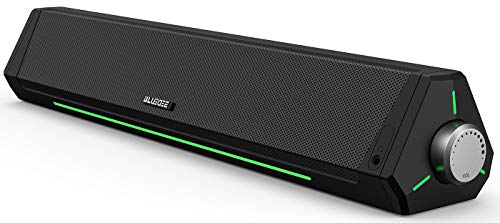
The Bluedee Computer Sound Bar is the kind of speaker that slips under a monitor and quietly does its job. Dual drivers handle mids and highs, and dual diaphragms (the vibrating surfaces inside the speaker that push air toward your ears) push a bit of bass into the mix. Anti-magnetic shielding helps prevent the buzzing or color distortion that older speakers sometimes caused on nearby monitors.
You can connect over Bluetooth for cable-free audio or plug in through the AUX jack for a wired link with a desktop. Compared to the BESTISAN pair above, this soundbar sacrifices true stereo separation in favor of a much smaller desk footprint. For dorm rooms, tight home offices, and minimal setups, that is a fair trade.
Strong Points
- Bluetooth plus AUX gives you wired stability and wireless convenience from one unit.
- Soundbar form factor frees up space that a stereo pair would normally claim.
- Anti-magnetic design reduces interference with older LCD monitors.
Worth Noting
- Bass response is limited because there is no dedicated subwoofer.
- Stereo imaging is narrower than a true two-cabinet pair like the BESTISAN set.
Made For
Students, renters, and home-office shoppers who want better sound than built-in laptop audio without giving up desk space.
Swap It Out When
Listeners who care about room-filling bass should move up to the Bluedee 2.1 PC Speakers with Subwoofer further down the list.
This Bluedee soundbar is the more gaming-focused sibling of the previous entry. A single USB-A or USB-C cable handles both power and audio, which is huge for clean battlestation setups where every extra wire matters. Built-in RGB lighting adds a bit of mood without forcing you to buy a separate light strip.
Around 10W of power fills a small to mid-size room comfortably for everyday work calls, video, and casual gaming. One thing worth flagging: the USB port on your monitor, PlayStation, or Xbox may or may not deliver digital audio, so you might need to plug into the PC itself for full functionality. For most desktop towers and modern laptops, it is a one-cable, no-driver experience.
Useful Strengths
- One-cable setup removes the AUX cord and the power brick from your desk.
- Integrated RGB lighting complements other gaming peripherals on the same desk.
- USB-C compatibility covers newer laptops and tablets.
Points To Keep In Mind
- Some monitors and consoles do not output digital audio over USB, which limits plug-and-play.
- Power output favors close-range listening rather than filling a large room.
Quick Facts
Who Will Love This
PC gamers and RGB-focused desk builders who want clean cable management and a bit of visual flair in one package.
Look Elsewhere When
Buyers who listen primarily to music with strong vocals may prefer the Bluedee PC Speakers with Dedicated Tweeters for sharper high-end detail.
This is the soundbar to look at if music matters as much as work. The 20W peak output comes from a four-driver array: two tweeters for clean highs and two full-range drivers for the midrange, supported by passive radiators (unpowered speaker cones that vibrate with the air pressure inside the cabinet to boost bass). DSP tuning, or digital signal processing, is a built-in chip that shapes the audio profile to keep distortion low and tame harsh high notes.
Bluetooth 5.4 offers a more stable wireless link than older versions, plus a single-knob control handles power, volume, and input switching without a tangle of buttons. You can also wire in over USB or USB-C for lossless audio from a desktop. Compared with the smaller Bluedee soundbars earlier in this list, the upgrade shows up in cleaner vocals and a wider soundstage.
Everyday Wins
- DSP tuning keeps music and dialogue smooth at higher volumes.
- One-knob control simplifies power, volume, and source switching.
- Bluetooth 5.4 delivers a steadier wireless connection with newer phones and laptops.
Honest Caveats
- Passive radiators help but cannot match a real subwoofer for deep bass impact.
- RGB lighting may be distracting in darker, focused work environments.
Best Suited To
Daily listeners who play a mix of music, podcasts, and games and want a soundbar that handles all three without compromise.
Another Choice May Suit
Mixed-use shoppers who watch more movies than they listen to music will get stronger bass from the Bluedee 2.1 PC Speakers with Subwoofer instead.
When a single soundbar is not enough, the 2.1 layout of this Bluedee set splits the audio into three channels: left speaker, right speaker, and a dedicated subwoofer for low frequencies. The 80W peak power rating is the highest on this list, which means the system can fill a living-room-sized space rather than just a desktop. A 2.1 system (a stereo pair plus a subwoofer) is the standard step up for anyone who watches a lot of films or plays action-heavy games.
The included power adapter handles the extra draw, so you do not have to worry about USB power limits. Bluetooth 5.4 plus USB, USB-C, and AUX inputs cover just about any source you can throw at it. Setup is a bit more involved because the subwoofer needs floor or shelf space, and depending on your apartment, neighbors may notice during late-night gaming sessions.
Positive Points
- Dedicated subwoofer delivers deep bass that single soundbars physically cannot reproduce.
- 80W peak output is comfortable for medium to large rooms.
- Multiple inputs let you switch between PC, phone, and TV without re-plugging cables.
Where It May Fall Short
- Subwoofer requires additional floor or desk space that compact setups may not have.
- External power adapter adds another cable to manage behind the desk.
Technical Reference
Whose Shelf It Belongs On
Home-theater PC owners, action-game fans, and anyone who wants movie-style rumble from a desktop setup.
Reach For A Different Pick When
Listeners in tight dorm rooms or shared apartments should consider the compact Bluedee Rechargeable Bluetooth 5.3 Sound Bar to keep things neighbor-friendly.
The Rechargeable Sound Bar is the most flexible unit in this lineup. A built-in battery means you can unplug it, carry it to the kitchen, and keep listening to a podcast while making coffee, then bring it back to the desk for the afternoon. Dual full-range drivers paired with dedicated tweeters aim for balanced audio whether you are watching a film or joining a video call.
You get both Bluetooth 5.3 for wireless sources and a 3.5 mm AUX jack for older laptops, projectors, or in-flight entertainment adapters. Compared with the wired soundbars earlier, the convenience trade-off is occasional recharging, so it pays to keep a USB-C cable handy for top-ups. For laptop nomads and shared-desk workers, that flexibility tends to outweigh the slightly lower sustained loudness.
What Earns Its Place
- Rechargeable battery frees the bar from a fixed power outlet.
- Bluetooth plus 3.5 mm AUX covers modern and legacy sources alike.
- Compact size slips into a laptop bag for travel or coffee-shop work sessions.
Possible Compromises
- Battery runtime is finite, and heavy daily use means frequent charging.
- Maximum volume is lower than the plug-in 2.1 system.
Who Should Grab It
Hybrid workers, students, and travelers who move between home, office, and shared workspaces and want one speaker that follows them around.
A Better Fit Elsewhere
Home listeners who never leave their desk will get fuller sound and louder output from the Bluedee 20W Peak Bluetooth 5.4 USB-C Sound Bar.
The PC Speakers with Dedicated Tweeters move away from the single-cabinet soundbar approach and into a more traditional 2.0 stereo pair. Each enclosure houses a 1.5-inch silk-dome tweeter, a small driver designed to reproduce high frequencies with smooth, non-fatiguing detail, plus a 3-inch full-range driver for the mids and bass. Up to 25W peak power gives them enough headroom for music, movies, and gaming without strain.
The honest read is that vocals and dialogue sound noticeably more defined on this set than on the all-in-one soundbars, which is why it earns a spot on the list. The trade-off is desk space: two cabinets need room to breathe for proper stereo imaging. Owners commonly report that placing them at ear level with a slight toe-in (angling the speakers inward toward your listening position) makes the biggest difference.
The Helpful Details
- Silk-dome tweeters reproduce high-frequency detail without the harsh edge common in budget drivers.
- True stereo pair creates proper left/right imaging for music and games.
- 25W peak output handles most room sizes comfortably.
Small Limitations
- Two cabinets demand more desk real estate than a single soundbar.
- No dedicated subwoofer means bass lovers may want to pair these with a separate low-frequency unit later.
Perfect Match For
Listeners who prioritize clear vocals, podcast editing, dialogue-heavy films, and acoustic music where detail matters more than rumble.
Skip It When
Anyone craving chest-thumping bass for first-person shooters or action movies should step up to the Bluedee 2.1 PC Speakers with Subwoofer.
The Dual Driver RGB USB Speakers close out the list with a thoughtful, low-fuss design. Two 5W drivers combine to deliver around 10W peak power, enough to fill roughly a 12 square meter space with clear, balanced sound. The whole unit draws power and audio through a single USB-A or USB-C cable, so there is no separate power brick to hide behind the monitor.
A front-panel headphone jack is the small touch that makes this set genuinely practical for late-night sessions. You can keep speakers muted for the household while routing audio to a headset without crawling behind the PC. Dynamic RGB lighting is included for those who like a bit of color, though it can usually be turned off for cleaner work environments.
Key Advantages
- Front headphone jack simplifies late-night listening without reaching behind the PC.
- Single-cable USB connection keeps your desk setup clean and simple.
- Compact footprint suits small desks, monitors with limited shelf space, or hot-desking setups.
Worth Bearing In Mind
- 10W peak power is best suited to personal or small-room listening, not large spaces.
- RGB lighting will not appeal to shoppers who prefer a strictly minimalist look.
Product Snapshot
Best Suited To
Home-office workers, casual gamers, and small-desk shoppers who want plug-and-play simplicity with a convenient headphone output.
Where A Sibling Pick Shines
Listeners who want richer, fuller sound for music and movies should consider the Bluedee 20W Peak Bluetooth 5.4 USB-C Sound Bar instead.
What Matters Most Before Choosing Computer Speaker Systems
Form Factor And Footprint
The first decision is how much desk space you can give up. A single soundbar slips under a monitor and leaves the rest of the surface free for keyboards, notebooks, and coffee cups. A stereo pair like the BESTISAN Computer Speakers or the Bluedee PC Speakers with Dedicated Tweeters needs room on each side of the monitor to create proper left/right imaging. A 2.1 setup adds a subwoofer that usually lives on the floor or a low shelf, which is fine in a living-room PC setup but awkward in a small bedroom.
Connectivity And Cabling
Look closely at how the speaker connects to your computer. USB-A and USB-C single-cable options like the Bluedee Bluetooth and USB PC Sound Bar RGB or the Bluedee Dual Driver RGB USB Speakers handle both power and audio in one cord, which is ideal for clean setups. Bluetooth adds wireless flexibility for phones and tablets, while optical and RCA inputs cover TVs and older sound cards. Owners commonly find that matching the input to your PC’s available ports saves a return trip.
Sound Profile And Use Case
Vocals, music, and movies each benefit from a different tuning. Systems with dedicated tweeters (the small drivers that handle high frequencies), like the Bluedee PC Speakers with Dedicated Tweeters, tend to make dialogue and acoustic music more articulate. A 2.1 system with a subwoofer shines for action games and blockbuster films, where low-frequency rumble adds real impact. A flat, balanced soundbar is usually the safest pick if you split your time evenly across work calls, casual music, and light gaming.
Key Considerations Across These Picks
Mistakes Worth Dodging
The most common slip-up is buying a single soundbar and expecting it to deliver deep bass. Physics gets in the way: a small cabinet cannot move enough air to reproduce low frequencies convincingly. Shoppers chasing chest-thumping action-movie sound should look directly at 2.1 systems. Another trap is assuming every USB port delivers digital audio. Some monitors and gaming consoles pass power only, which means a USB-only speaker may stay silent when plugged into the wrong port. The Bluedee product descriptions flag this clearly, and it is worth reading the fine print before purchase.
Why Top Tier Costs More
The jump from a budget soundbar to a higher-tier system like the Bluedee 2.1 PC Speakers with Subwoofer shows up in three places: driver quality, cabinet size, and amplification. Dedicated subwoofers need larger enclosures and more powerful amplifiers to reproduce low frequencies cleanly, which raises the bill of materials. Higher-tier units also tend to include DSP tuning, a built-in digital processor that adjusts the audio signal in real time to reduce distortion and balance output across frequencies. For shoppers who mostly listen to podcasts and work calls, the upgrade may not be worth it, but for anyone who values music and film audio, the difference is noticeable the moment you press play.
Frequently Asked Questions
How many watts do I need for a desktop speaker?
For a personal desk setup in a small to mid-size room, 10W to 25W is generally enough for clear, comfortable listening without distortion. Larger rooms or shared living spaces benefit from 50W or more, often paired with a dedicated subwoofer.
Do I really need a subwoofer for computer audio?
Not always. For voice calls, podcasts, and most background music, a quality 2.0 stereo pair handles things well. You only need a subwoofer if you regularly watch action films, play bass-heavy games, or listen to music genres where low-end weight matters.
Is Bluetooth audio quality good enough for daily use?
Modern Bluetooth versions like 5.3 and 5.4 offer stable connections and solid audio for casual listening. Audiophiles may still prefer wired USB or optical connections for lossless playback, but most people will not notice the difference in everyday use.
Can I leave computer speakers on all the time?
It depends on the unit. Plugged-in, powered models like the BESTISAN set can stay on indefinitely, though turning them off saves energy and extends driver life. Battery-powered speakers like the Bluedee Rechargeable Sound Bar should be powered down when not in use to preserve runtime.
Will USB-only speakers work with my monitor?
Not always. Some monitors pass power through USB but do not relay digital audio, which means the speaker will receive electricity but no sound. Plugging directly into the PC’s USB port is the safer choice for full compatibility.
Bottom Line
The right computer speaker system depends on your desk, your room, and what you actually listen to. A compact soundbar covers most daily needs, a 2.1 setup adds rumble for movie nights, and a rechargeable model travels with you. Match the form factor to your space, the connections to your PC, and the sound profile to your habits, and you will end up with audio that simply makes the computer feel complete.


