

Pairing a 24-inch iMac with tinny built-in audio feels like a missed opportunity, especially when the display is this good and the room is this quiet. The right external speaker set turns a workspace into something that sounds as considered as it looks, whether the day is spent editing clips, hopping through calls, or winding down with a film. This roundup walks through ten options that span tight desks, large studios, and anywhere in between, so you can land on a fit that respects your space and your habits.
The Picks In Brief

FUNLOGY 14W Stereo PC Speakers, USB Powered, Compact with 30° Tilt (White)

Apple 2024 iMac All-in-One Desktop Computer with M4 chip, 24-inch Retina Display (Pink)

BESTISAN Computer Speakers, PC Speakers with Bluetooth Mode; Powered Monitor Speakers (White)

FUNLOGY 14W Stereo PC Speakers, USB Powered, Compact with 30° Tilt (Black)

Creative Pebble 2.0, USB Desktop Stereo Speakers for PC/Laptop (Black)

FUNLOGY Portable Mini2 Bluetooth Speaker, IPX7 Waterproof, TWS Stereo Pairing (White)

Apple 2021 iMac All-in-One Desktop Computer with M1 chip, 24-inch Retina Display (Blue)

FUNLOGY Speaker Plus, 14W Stereo, Dual Amplifiers and DSP Tuned, USB-C Powered (Black)
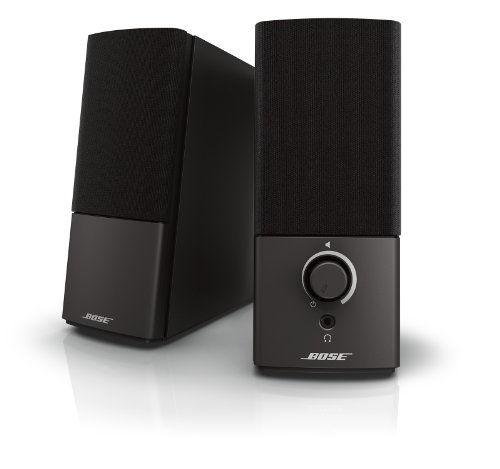
Bose Companion 2 Series III Multimedia Speakers for PC (3.5mm AUX and PC Input, Black)
Why These Options Stand Out
The FUNLOGY 14W Stereo lands where most iMac owners actually live: a small desk with a clean cable path and no patience for a wall wart. Total power here is 14 watts split across the pair, which is generous for compact USB speakers, and the 30° upward tilt sends sound toward seated ear level rather than your chest.
Setup is essentially zero friction. A single USB cable handles both power and audio on the host computer, so the white shells sit neatly under a 24-inch display without the usual tangle. For open-plan offices or shared bedrooms, the volume dial is easier to reach than a software slider.
The Case For It
- USB-only connection trims cable clutter, a real win for minimal iMac desks.
- 30° upward tilt aims sound at seated ear height, which usually sits below the display.
- 14W total output covers a small office or bedroom without strain.
- Compact footprint slides under a monitor stand without crowding the front edge.
- Physical volume dial is faster than navigating System Settings mid-call.
Things To Consider
- No Bluetooth or auxiliary input, so phone audio stays on the phone.
- USB power caps peak volume; pushing to the top can flatten dynamics in larger rooms.
Key Specs
Made For
Owners who want a tidy white setup under a 24-inch iMac and listen at moderate volume through one host computer.
Look Elsewhere When
You need Bluetooth for a phone or tablet, in which case the BESTISAN Computer Speakers with Bluetooth Mode handles that role without a dongle.
Listing the iMac itself in a speaker roundup feels odd until you remember the 24-inch model’s built-in speakers are tuned for the chassis and macOS audio routing is seamless. The 2024 M4 configuration brings a 10-core CPU and GPU, 16GB of unified memory, and a 512GB SSD, which is plenty of headroom for editing projects, music production, or long compile times.
The pink finish exists for visual matching, but the real play is software. Apple Intelligence features are integrated, and the all-in-one format means the speakers are physically positioned to project toward the user. For anyone whose priority is a single tidy package rather than a tower-plus-cables setup, this is the cleanest path.
What Pays Off
- 24-inch Retina display gives creators and editors generous real estate without a second monitor.
- Native macOS audio routing avoids driver issues that sometimes surface with third-party speakers over USB hubs.
- 16GB unified memory handles multitasking across creative apps without the spinning beachball.
- Slim all-in-one design means the desk stays open for a keyboard, notebook, and one coffee.
Trade Offs
- Internal speakers cannot match a dedicated 2.1 set like the Logitech Z623 for room-filling volume.
- 512GB fills quickly with 4K video; external storage becomes a near-certainty for content creators.
Right Fit For
Users who want the cleanest one-cable Mac experience and prioritize a color-matched, integrated look over raw speaker output.
Swap It Out When
Audio is a daily priority, in which case pairing the iMac with the Bose Companion 2 Series III delivers a wider, fuller soundstage than the built-in drivers can produce.
Some days the iMac handles calls, other days it’s a turntable for a phone on the kitchen counter. The BESTISAN powered monitor speakers answer that hybrid life by accepting both wired and Bluetooth sources, so the audio chain does not have to be rebuilt each time you switch devices.
They sit in the powered monitor category, which means each cabinet has its own amplification, and they are voiced for desktop distances rather than across-the-room listening. Owners commonly pair them with a Mac and a streaming phone without juggling cables in between.
Why It Works Well
- Bluetooth mode adds phone and tablet support without swapping cables behind the desk.
- Powered monitor design keeps audio lively at low volumes, helpful for late-night sessions.
- White finish aligns with the silver-and-white iMac aesthetic many users prefer.
Points To Keep In Mind
- Bluetooth adds a slight compression that purists can hear on lossless tracks.
- More inputs mean more cables to manage if every port stays populated.
At A Glance
Who It Suits Best
Listeners who bounce between the iMac and a phone throughout the day and value a single speaker pair that handles both.
Where Another Pick Suits Better
You prefer a single-cable, no-wireless setup, in which case the Creative Pebble 2.0 keeps the desk completely USB-only.
Identical hardware to the white FUNLOGY in slot 1, but the black finish tells a different story next to a space-gray Magic Keyboard or a darker desk. For workspaces already carrying the graphite Apple accessories, this color match reads intentional rather than approximate.
Same 14W output, same USB-only cable path, same 30° upward tilt. The choice comes down to whether the room leans cool and bright or warm and dim, and which finish the eye prefers at the edge of the desk.
Bright Spots
- Black finish disappears visually against dark desks and bezels.
- Same tilt geometry as the white sibling, so audio projection stays on target.
- USB-only path keeps a single cable from iMac to speaker.
Honest Caveats
- Same limitation as the white version: no wireless, no auxiliary input.
- Black plastic shows dust more than the white shell in bright rooms.
Best Suited To
Users with a graphite-and-black desk theme who want the FUNLOGY signature in a color that recedes rather than pops.
Not Your Match When
You want stronger low-end response, in which case the Logitech Z623 2.1 system brings a dedicated subwoofer to the equation.
The Creative Pebble 2.0 has earned a long shelf life for one reason: it does the simple job very well. A single USB cable carries both power and audio, the orb-shaped cabinets barely take up room, and the 45° elevated driver angle aims sound at the listener rather than the desk surface.
For an iMac parked on a smaller desk, perhaps in a bedroom or studio apartment, this is a polite, unobtrusive addition. The trade-off is modest bass and limited maximum volume, but in near-field desktop use that rarely matters.
What It Does Well
- One USB cable handles everything, so the back of the iMac stays uncluttered.
- Compact orb shape fits where traditional rectangular speakers cannot, like between a monitor stand and a wall.
- Elevated driver angle keeps sound on target for seated listeners.
Worth Noting
- No Bluetooth or auxiliary input, so the speaker pair is locked to the host computer.
- USB power caps the upper volume ceiling, noticeable in larger rooms.
Perfect Match For
Listeners with a small iMac desk who want the smallest possible footprint and the fewest possible cables.
A Better Fit Elsewhere
You want richer sound, in which case the FUNLOGY Speaker Plus brings dual amplifiers and DSP tuning to the same compact footprint.
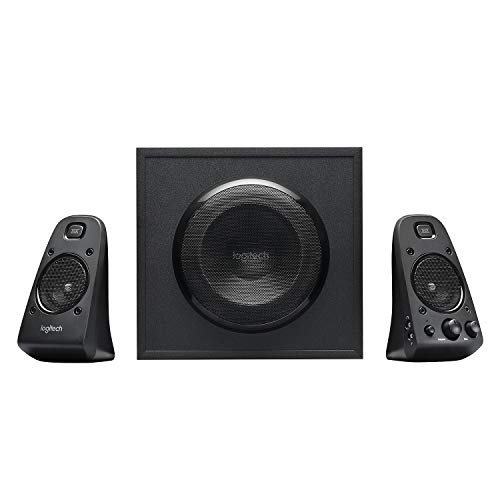
For iMac owners who treat the desk as a small media room, the Z623 changes the conversation. The 2.1 layout pairs two satellite cabinets with a dedicated subwoofer, and the THX certification means the system was tuned to a recognized studio reference rather than left to marketing copy. 400 watts of total system power gives the satellites and sub plenty of headroom.
The catch is footprint. The sub belongs on the floor, the satellites want real estate on either side of the 24-inch display, and the cable runs are longer than a USB-only setup. For a corner office or a basement workspace, the trade is usually worth it.
Where It Helps
- Dedicated subwoofer delivers low-end response that compact stereo pairs cannot match.
- Multiple inputs let the iMac, a console, and a phone share the same speaker pair.
- THX tuning gives a recognizable reference point for film and gaming audio.
Trade-Offs To Consider
- Three cabinets plus cables demand more desk and floor space than typical compact speakers.
- No Bluetooth, so wireless devices need an adapter or a wired route.
Feature Snapshot
Who Will Love This
Gamers, film watchers, and music listeners who want their iMac to anchor a real home audio setup, not just a desk pair.
Reach For A Different Pick When
Your workspace is small, in which case the Creative Pebble 2.0 keeps the setup to two tiny orbs and a single cable.
The Mini2 bends the category on purpose. It is a portable Bluetooth speaker with a 5W driver, a passive radiator for bass, and IPX7 waterproofing, which means brief dunks are survivable. TWS pairing lets you run two of them as a stereo pair when you want more presence.
For an iMac owner whose work happens in cafes, hotel rooms, and shared spaces, the Mini2 takes the place of a desk-bound pair. The 5W output is honest about its size; in a quiet home office it is plenty, in a busy cafe you may find yourself wishing for more.
Useful Highlights
- IPX7 waterproofing shrugs off spills, useful in kitchens and outdoor workspaces.
- TWS pairing doubles up to two units for true stereo when the room allows.
- Built-in mic handles quick calls without grabbing a headset.
A Few Limitations
- 5W output is modest in larger rooms or outdoor settings.
- Battery life requires regular charging on heavy travel days.
Quick Facts
Built With In Mind
iMac owners who split their week between a home desk and travel locations, and want one speaker that survives both.
Skip It When
You need a permanent desk anchor with stronger low-end, in which case the Logitech Z623 was built for stationary listening rooms.
The 2021 iMac is the older sibling in this list, but it still earns attention. The M1 chip brought serious performance to the all-in-one form factor, and the blue finish gives a specific room a deliberate splash of color. The 24-inch Retina display, 8GB of RAM, and a 256GB SSD cover everyday work without strain.
Compared to the 2024 model in slot 2, this iMac trades some memory and storage for a lower entry cost, which is meaningful for shoppers who need an Apple-native experience without the top-tier configuration.
Noteworthy Benefits
- Blue color stands out as a deliberate design choice in a neutral room.
- M1 chip still handles daily creative work, browsing, and video calls without slowdown.
- Native macOS audio routing matches the 2024 model’s behavior, so speaker pairing works the same way.
Some Limits To Know
- 8GB of RAM and 256GB of storage are tighter than the 2024 configuration for heavy workflows.
- Built-in speakers still benefit from external help for music lovers.
Whose Shelf It Belongs On
Value-minded iMac shoppers who want a color-matched all-in-one and plan to pair it with an external speaker like the Bose Companion 2.
Where Another Pick Suits Better
You want a dedicated speaker upgrade without replacing the whole computer, in which case the Bose Companion 2 Series III adds richer sound on its own.
The Speaker Plus takes the FUNLOGY formula and tightens the screws. The 14W output stays the same, but dual amplifiers and DSP tuning (a digital signal processor that adjusts the audio in real time) push the speakers toward a cleaner, more dynamic presentation. USB-C power and a 3.5mm auxiliary input address two common gripes with the standard model.
For a modern iMac, which ships with USB-C and Thunderbolt, this is the more natural cable fit. DSP also helps keep voices intelligible during calls, a real upgrade over typical compact speakers that can blur speech.
Reasons It Performs
- USB-C power pairs with modern iMacs without adapters or hubs.
- 3.5mm input gives a fallback for older audio sources or a second device.
- DSP tuning helps dialogue stay clear during video calls and films.
Softer Spots
- Slightly higher cost than the standard FUNLOGY without a dramatic size change.
- Still a compact pair, so large rooms will not get the same coverage as a 2.1 system.
Who Should Grab It
iMac owners with USB-C and Thunderbolt who want a refined compact upgrade over a basic USB pair.
Consider Something Else When
You want room-shaking volume, in which case the Logitech Z623 2.1 system fills much larger spaces without breaking a sweat.
The Companion 2 Series III is a long-running design that has earned its reputation through iteration. Bose’s signature tuning aims for clear sound at any volume, with a 3.5mm auxiliary input on the front of one cabinet for a quick phone or tablet hookup. There is also a dedicated PC input for the iMac’s headphone jack.
Compared with smaller USB pairs, the Companion 2 leans toward a fuller, room-friendly sound at modest volumes. Owners commonly leave them at low levels for background music all day, then nudge them up for films.
What Helps Most
- Front-mounted 3.5mm input makes phone and tablet hookups effortless.
- Tuned for clear sound at any volume, useful for long working sessions.
- Refined Bose voicing suits both spoken-word content and music.
Where It Is Less Suited
- No Bluetooth, so wireless devices need a cable or adapter.
- Cabinet size is larger than the most compact USB pairs, so tight desks may feel crowded.
The Right Fit
iMac owners who want a polished, all-day listening experience and prefer Bose tuning over compact USB convenience.
Where A Sibling Pick Shines
You need a wireless option, in which case the BESTISAN Computer Speakers with Bluetooth Mode covers the same role with phone-friendly flexibility.
Matching Computer Speakers To Your iMac Setup
Decide How The Speakers Will Live
The first honest question is whether the speakers live permanently on the iMac desk or move with you. A static pair like the Bose Companion 2 or the Logitech Z623 rewards a fixed listening spot, while a portable unit like the FUNLOGY Mini2 makes more sense for a workflow that shifts between home, cafes, and travel. A USB-only pair keeps cable clutter to a minimum, but it also limits which devices can drive the speakers without adapters.
Match The Connection To The Source
A modern iMac has USB-C, USB-A, and a 3.5mm headphone jack on the back. A compact USB pair takes one cable, leaving the rest of the ports free. A 2.1 system like the Z623 typically uses 3.5mm or RCA, which works fine but means a longer cable run. If a phone or tablet is part of the daily rotation, Bluetooth support (as in the BESTISAN Computer Speakers) removes the cable swap entirely.
Think About Room Size And Volume Goals
A small bedroom or home office rarely needs a subwoofer. A living-room workspace, a basement den, or a multi-use space benefits from the dedicated low-end cabinet in a 2.1 system. Compact USB pairs can sound thin when pushed to fill larger rooms, and you may find the maximum volume level disappointing during a film night.
Voice Clarity Matters More Than Spec Sheets
For video calls, podcasts, and YouTube lectures, dialogue clarity is the metric that actually matters day to day. Speakers with DSP tuning, like the FUNLOGY Speaker Plus, tend to keep voices intelligible at low volumes, while plain stereo pairs can blur speech when the bass is loud. For all-day work setups, that difference adds up.
What To Double-Check Before You Click
Pitfalls Shoppers Hit
The most common mistake is buying compact speakers for a room that needs a 2.1 system, then wondering why music feels thin. The flip side is buying a big 2.1 system for a tiny desk, where the subwoofer overwhelms the satellites at near-field distances. The other frequent miss is ignoring the input count: a 3.5mm-only pair cannot accept a phone and a console at the same time without swapping cables.
Why Top Tier Costs More
Higher-tier options like the Logitech Z623 or the Bose Companion 2 invest in larger drivers, dedicated amplification, and more rigorous tuning. Those upgrades show up as fuller sound at low volumes, more controlled bass, and longer product lifespans. For an iMac that sits at the center of a daily workflow, the upgrade is usually worth it because the speakers get used for hours, not minutes.


