

Your monitor’s built-in audio gets old fast: muffled dialogue in video calls, thin music in the background, and gaming explosions that sound like someone tapping a desk. A proper pair of USB-powered speakers turns your desk into a real listening space without filling it with gear. The trick is matching the speaker to how you actually use your computer, whether that’s a WFH office, a gaming battlestation, or a small bedroom setup.
Your Options, Compared
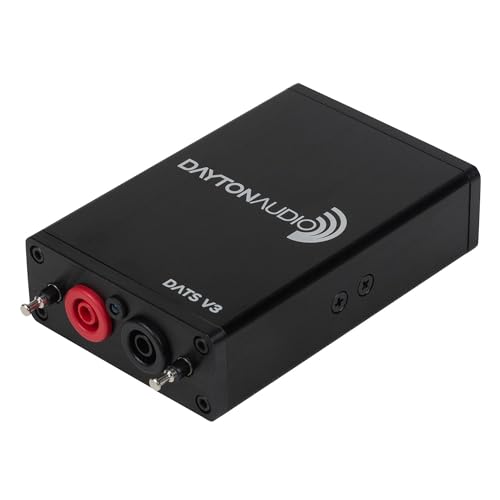
Dayton Audio DATS V3 Computer-Based Speaker & Audio Component Test System

FUNLOGY 14W Stereo PC Speakers, USB Powered, 30° Tilt, White

Divoom MiniToo Retro PC-Style Computer Speaker with Pixel Screen

BESTISAN Computer Speakers with Bluetooth, Powered Monitor Speakers, White

FUNLOGY 14W Stereo PC Speakers, USB Powered, 30° Tilt, Black
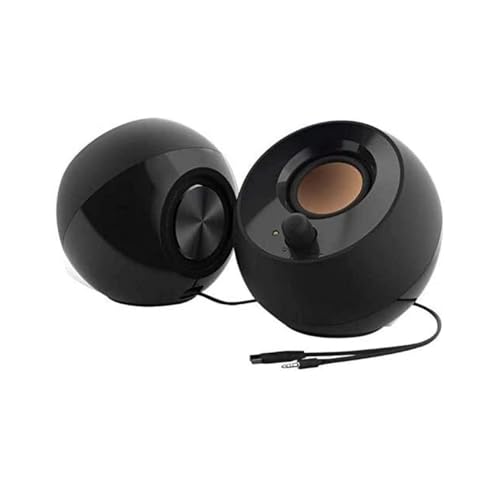
Creative Pebble 2.0 USB Desktop Stereo Speakers, Black

Kanto YU2MB PC Gaming Desktop Speakers with Built-in USB DAC, Matte Black

FUNLOGY Speaker Plus 14W Stereo with Dual Amplifiers, DSP, USB-C
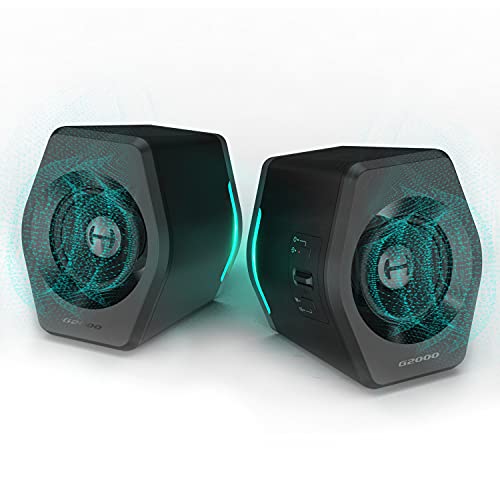
Edifier G2000 32W PC Gaming Speakers with Bluetooth, USB, 3.5mm AUX, RGB
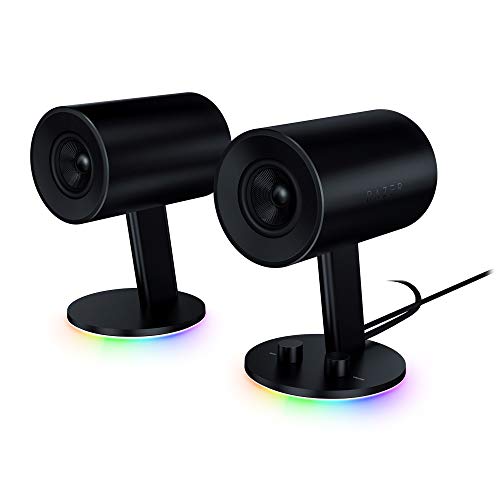
Razer Nommo Chroma 2.0 PC Gaming Speakers with RGB Lighting
More On The Choices That Made The List
Dayton’s DATS V3 isn’t a speaker that plays music; it’s a USB measurement instrument built for anyone who designs, repairs, or refines loudspeakers and crossovers. If you’ve ever tried to tune a ported box by guessing at Thiele/Small parameters (a standard set of numbers describing how a driver behaves in an enclosure), this unit plugs into your PC and reads impedance curves in real time.
It’s an outlier on this list, but a genuinely useful one for hobbyists. Everyone from here forward in the lineup is a traditional listening speaker, so consider DATS V3 as the bench tool and the rest as the desk companions. Best for builder types who want accurate readings without renting lab gear.
Useful Highlights
- USB interface means no extra sound card is needed; measurement data shows up directly in the included PC application.
- Reads Thiele/Small parameters (Fs, Qts, Re) and full impedance response automatically, so calculations that used to take an afternoon shrink to a single sweep.
- Works on bare drivers, crossover networks, and finished cabinets, making it useful at any stage of a build.
- Compact enough to live in a drawer between projects.
Things To Consider
- Not a listening speaker, so this entry only fits a niche audience already deep in DIY audio.
- You’ll still need to learn the basics of impedance (electrical resistance that changes with frequency) and parameter interpretation to use the readings well.
Feature Snapshot
Who It Suits Best
Experienced DIY speaker builders measuring drivers and ported enclosures in a home workshop benefit most from this tool.
Where Another Pick Suits Better
If you want to play music, skip to the FUNLOGY 14W Stereo PC Speakers (Black) for actual desktop audio.
FUNLOGY’s white stereo pair packs 14 watts total output into a footprint small enough to sit beside a keyboard without crowding it. The 30-degree upward tilt aims drivers at your ears rather than your chest, which usually means clearer vocals during video calls and podcasts without needing to crank the volume.
The unit draws power and audio through a single USB connection, so there’s no wall adapter to find a free outlet for. In a tidy white setup, the cosmetic match is hard to argue with. The trade-off shows up if you want any real low-end rumble; these are designed for desk-distance listening, not room-filling party audio.
Real-World Strengths
- Palm-sized enclosures fit under most monitors without blocking the screen.
- The 30° tilt cuts down on the “staring at your knees” effect common with low-sitting speakers.
- USB-powered design means fewer cables behind the desk.
- Front-facing volume dial is faster than digging through software sliders.
Worth Noting
- Bass response stays light, so action games and bass-heavy music feel thinner than on larger units like the Edifier G2000.
- White finish shows dust and scuffs more readily than darker options.
Right Fit For
Remote workers and students with small white desks who want clean vocal clarity for meetings and study sessions.
Look Elsewhere When
If you need stronger bass for late-night gaming, the Edifier G2000 32W PC Gaming Speakers bring noticeably more punch.
Divoom’s MiniToo looks like a tiny 1990s desktop PC and acts like a 5-watt near-field speaker (designed for close-up desk listening rather than across-the-room volume). The 1.77-inch pixel display pushes retro clock styles, pixel faces, and short text animations through the companion app, giving you a desktop mascot that doubles as a Bluetooth speaker.
The audio leans warm and vocal-friendly, which suits podcasts and lo-fi study playlists. Where it differs from the FUNLOGY pair reviewed earlier is the personality factor: this one earns its spot as much for what it shows on screen as for what it plays. Owners commonly use it on desks where decor matters as much as sound.
Reasons It Performs
- Customizable pixel display adds visible character that no other speaker in this lineup offers.
- Near-field tuning keeps dialogue and vocals clear at arm’s length.
- Bluetooth connectivity frees your desk from cables if you already have a powered USB option.
- Compact form factor fits nightstands, dorm desks, and small creative nooks.
Points To Keep In Mind
- 5-watt output won’t fill a large room, so apartment dwellers with thin walls may find the ceiling lower than expected.
- The companion app is the only way to customize the pixel display, which adds a setup step compared to plain speakers.
Quick Facts
Made For
Creatives, students, and pixel-art fans who want their speaker to double as a personalizable desk piece.
Skip It When
Anyone prioritizing loud, room-filling audio for gaming sessions should look at the Razer Nommo Chroma instead.
BESTISAN takes a different route than the FUNLOGY pair by adding Bluetooth alongside its wired inputs, so you can stream from a phone or tablet without unplugging the speaker from your PC. The powered monitor style suits setups where the speakers live on either side of a display, with RCA (the classic red-and-white analog plugs) and optical inputs covering older devices as well as modern ones.
The white cabinet pairs well with bright desks. Compared to the FUNLOGY 14W Stereo pair, BESTISAN trades some compactness for connection flexibility. For mixed-use households where one speaker handles computer audio in the day and music from a phone at night, that flexibility tends to matter.
Where It Excels
- Bluetooth mode makes streaming from phones and tablets effortless.
- Optical and RCA inputs support legacy gear alongside modern sources.
- Powered monitor design means no separate amplifier is required.
- White finish blends well with light-themed rooms.
Honest Caveats
- Larger footprint than the FUNLOGY pair, so cramped desks may feel crowded.
- Bluetooth audio adds a small amount of compression (data loss when audio is encoded for wireless transmission), which audiophiles may notice on high-bitrate tracks.
Best Suited To
Home office users who split time between wired PC audio and wireless phone streaming on the same speaker pair.
A Better Fit Elsewhere
If you only need USB audio and want the smallest possible footprint, the Creative Pebble 2.0 keeps things simpler.
This is the black twin to the white FUNLOGY covered earlier, and the audio and ergonomic design are otherwise identical. Dual 48mm full-range drivers paired with passive radiators (a non-powered driver that uses air motion to reinforce bass) push 14 watts of total output, and the same USB cable handles both power and audio signal.
What changes is the cosmetic fit. Black enclosures tend to disappear against dark monitors and gaming desks, where white units can feel out of place. If your setup runs a black keyboard, mouse pad, and monitor bezels, this color choice tends to look more intentional. The 30-degree tilt continues to be the real ergonomic win for desk-distance listening.
What It Does Well
- Same USB-only wiring as the white version, so installation stays simple.
- Black finish hides fingerprints more effectively than the white option.
- Compact pair fits beside laptops without dominating the desk surface.
- Passive radiators add a bit more perceived bass than typical 48mm drivers alone.
Room For Improvement
- No Bluetooth, so swapping to phone audio means unplugging from the PC.
- Volume dial placement is convenient but small enough to nudge accidentally on a tight workspace.
Spec Overview
Who Should Grab It
Anyone with a black desk setup who wants the simplest possible USB-only stereo experience at a compact size.
Consider Something Else When
If you want stronger bass for cinematic games, the Kanto YU2MB adds a silk dome tweeter for cleaner highs.
Creative’s Pebble 2.0 has been a dorm-room staple for years, and the recipe still works: one USB cable for power and audio, with no driver installation, no power brick, no fuss. The 45-degree elevated drivers aim at your ears from a low-sitting position, which is the ergonomic move that justifies the otherwise odd spherical shape.
It’s smaller than the FUNLOGY 14W pair and lighter on bass, but the simplicity wins points for anyone who plugs a speaker in and expects it to just work. Compared to the Kanto YU2MB reviewed later in the list, the Pebble sacrifices audio refinement for plug-and-play convenience. Best for laptop owners who move their setup between rooms.
Features That Help
- Single USB cable handles power and audio without extra adapters.
- Rear-facing passive radiators (non-powered diaphragms tuned by air pressure) give the small enclosure a fuller sound than its size suggests.
- Elevated driver angle keeps audio aimed at ear height.
- Minimal design fits almost any desk aesthetic.
Trade Offs
- Limited maximum volume makes it less suited to noisy shared spaces.
- No Bluetooth, so all audio has to come through the wired USB connection.
Feature Card
Whose Shelf It Belongs On
Students and laptop-first users who want the smallest setup footprint with zero configuration steps.
Reach For A Different Pick When
If your desk has room and you want fuller audio, the Kanto YU2MB is a meaningful step up.
Kanto’s YU2MB is the most audio-focused unit in this lineup, pairing a 3-inch composite driver (a driver cone made from layered materials for stiffness and lightness) with a 3/4-inch silk dome tweeter (a small high-frequency driver using a soft fabric dome for smoother treble) inside a Class D amplifier cabinet (a switching amp design that runs cool and efficient). The built-in USB DAC (digital-to-analog converter, which turns your computer’s digital audio into an analog signal the speakers can actually play) means the speaker handles the conversion itself, often resulting in cleaner playback than your motherboard’s onboard audio.
At just under 6 inches tall, it stays desk-friendly while delivering noticeably better sound than the FUNLOGY pair or Creative Pebble reviewed earlier. The subwoofer output offers a future upgrade path if you want to add a low-end unit later. Where it differs from the Edifier G2000 is the refinement: this one leans musical rather than gaming-flavored.
Where It Delivers
- Built-in USB DAC bypasses (skips around) lower-quality onboard computer audio.
- Silk dome tweeter keeps high frequencies smooth instead of harsh.
- Subwoofer output gives you a path to add bass later.
- Matte black finish looks deliberate on a refined desk.
Less Ideal Details
- No Bluetooth, so the connection stays wired.
- Premium positioning means you’ll pay more than basic USB pairs.
Technical Highlights
Perfect Match For
Listeners who prioritize music quality and clean vocal reproduction on a refined desktop setup.
Swap It Out When
If RGB lighting and a gaming-focused sound profile matter more, the Razer Nommo Chroma is a better match.
The Speaker Plus takes the same 14-watt chassis as FUNLOGY’s basic pair and adds two meaningful upgrades: dual amplifiers (one per channel, rather than a shared amp) and DSP tuning (digital signal processing that shapes the sound profile in real time). USB-C power handles both modern laptops and phones without an adapter, and the 3.5mm AUX input covers older sources.
The real-world payoff is louder, cleaner sound at higher volumes than the standard FUNLOGY pair reviewed earlier. Dialogue stays intelligible when game sound effects peak, which is the kind of thing you notice during a long session. It still won’t shake the walls like a 32W gaming unit, but the headroom (extra volume capacity before distortion) improvement is worth the step up for anyone who listens at moderate-to-high volumes.
Positive Points
- USB-C input suits modern laptops without dongles or adapters.
- Dual amplifiers reduce distortion when both channels push hard.
- DSP tuning shapes the response for clearer vocals and effects.
- 30° tilt design carries over from the standard FUNLOGY pair.
Practical Considerations
- Compact size still caps total bass output compared to larger units.
- USB-C power delivery varies between laptops, so maximum volume may differ between machines.
Built With In Mind
Modern laptop users on USB-C who want louder, cleaner output than the entry-level 14W FUNLOGY pair delivers.
Where A Sibling Pick Shines
If you mostly use an older desktop PC, the standard FUNLOGY 14W pair keeps things simpler.
The G2000 pushes 32 watts of total output through 2.75-inch full-range drivers with a backward-facing bass port (a tuned opening that lets the cabinet push more low-end air). A separate subwoofer output gives you the option to bolt on more low end later. The Bluetooth, USB, and 3.5mm AUX trio of inputs covers just about any source you can throw at it.
Three EQ modes (Game, Music, Movie) let you tune the sound profile without opening software. Compared to the Kanto YU2MB, the G2000 trades some musical refinement for outright volume and bass punch. The RGB lighting is on the subtler end of the spectrum, so it adds desk glow without turning the room into a disco.
Notable Gains
- 32W output fills medium-sized rooms without strain.
- Three EQ presets cover gaming, music, and movie watching.
- Subwoofer output allows low-end expansion when you’re ready.
- Bluetooth mode pairs with phones and tablets quickly.
Some Limits To Know
- RGB lighting isn’t customizable through software, so you’re locked to the built-in patterns.
- Larger footprint than compact 14W pairs.
The Right Fit
Gamers and movie watchers who want louder, fuller sound than compact USB pairs can deliver at a desk.
Not Your Match When
Anyone prioritizing tonal refinement over volume should consider the Kanto YU2MB instead.
Razer’s Nommo Chroma closes out the list with custom 3-inch woven glass fiber drivers (driver cones woven from glass fiber strands for stiffness and low distortion), rear-facing bass ports for low-end weight, and a bass knob with automatic gain control (a circuit that prevents the bass from getting louder than the rest of the signal, avoiding distortion). Chroma RGB lighting ties into Razer’s ecosystem if you already run other Chroma-enabled peripherals.
The sound signature leans toward gaming, with positional cues and explosions getting more attention than vocal warmth. Compared to the Edifier G2000, the Nommo trades EQ flexibility for a stronger gaming DNA. If you’re already running a Razer keyboard and mouse, the lighting sync is the real selling point.
A Strong Showing
- Custom woven drivers deliver clearer mids than typical 3-inch cones.
- Automatic gain control on the bass knob prevents low-end distortion at high volume.
- Chroma RGB syncs with other Razer peripherals for unified lighting.
- Rear-firing bass ports extend the low end without a separate subwoofer.
Potential Drawbacks
- Sound profile leans gaming rather than music, so audiophiles may prefer the Kanto YU2MB.
- USB-powered only; the unit needs software for full Chroma customization.
Who Will Love This
Razer ecosystem owners who want speakers that match the rest of their setup’s lighting and gaming feel.
Another Choice May Suit
Listeners focused on music over RGB effects should look at the Edifier G2000 for a more flexible EQ.
What To Weigh Before Picking Your Next Desktop Speakers
Driver Size And Cabinet Tuning
Small drivers (under 3 inches) fit on crowded desks and lean vocal-friendly, but they can’t push much air for bass. Larger 3-inch drivers and dedicated bass ports give you fuller sound at the cost of footprint. If your desk is tight, prioritize tilt angle and stereo separation; if your desk has room, prioritize driver size.
Connection Type And Cable Layout
USB-only setups keep things simple and draw both power and audio through one wire, which is great for laptops. Bluetooth adds wireless convenience at the cost of small audio compression. Optical and RCA inputs matter only if you’re connecting older TVs or game systems; for most PC users, USB plus optional Bluetooth covers every realistic source.
Volume Needs And Room Size
A 5-watt near-field speaker suits desk-distance listening in a quiet room. A 14-watt pair handles video calls and casual music in a shared office. A 30-watt-plus unit fills a medium-sized room or handles action games without strain. Match the wattage to your typical room size and listening distance, not to spec sheet bragging rights.
Extra Features Worth Paying For
EQ presets, subwoofer expansion ports, and built-in DACs all add genuine capability. RGB lighting and pixel displays add personality but no audio benefit. For most shoppers, the audio-focused extras pay off more reliably than the cosmetic ones.
Key Considerations Across These Picks
Pitfalls Shoppers Hit
Many people buy the smallest, cheapest pair and end up with thin sound that doesn’t satisfy. Others grab a high-wattage gaming unit for a quiet home office and end up never using the power. The honest read is that matching the speaker to your real listening distance and room size matters more than chasing the highest wattage.
Skip Bluetooth if you only ever play from your PC, and skip RGB if your desk faces a wall. Buying features you won’t use tends to clutter the setup without improving the audio.
When Paying More Pays Off
Upgrading from a 5W pair to a 14W pair with DSP tuning (digital signal processing, where software shapes the sound profile) brings noticeably cleaner vocals and effects. Going further to a built-in DAC plus dedicated tweeter adds genuine musical refinement, not just louder volume. The extra money tends to buy headroom (extra room in the volume range before distortion) and clarity, which matter most during long listening sessions.
Premium tiers also tend to last longer because better drivers and cabinets hold up over years of daily use. If your speakers stay on your desk for eight hours a day, that durability adds up.
Frequently Asked Questions
Do USB speakers need a separate power adapter?
Most USB-powered speakers draw all needed power from the USB port itself, so no wall outlet is required. Higher-wattage units sometimes include an external adapter for full output.
Can I use Bluetooth and USB at the same time?
Most speakers accept one source at a time, so you’ll switch between USB and Bluetooth rather than mix them. Check the unit’s manual if you need simultaneous input handling.
Will USB speakers work with a Mac?
USB audio is a standard across operating systems, so most pairs work with macOS without extra drivers. Some gaming-focused units are tuned for Windows software, which is worth checking if you’re on Mac.
How long do desktop speakers usually last?
A well-built pair can serve a typical desk for many years of daily use, especially if kept away from dust and moisture. Driver failures are uncommon in this category under normal conditions.
Is a subwoofer necessary?
For casual music, video calls, and most games, a quality 2.0 pair handles the job. Bass-heavy genres and cinematic gaming benefit more from a dedicated sub, but it’s a step most people can skip.
The Takeaway
Your desk, your room, and your listening habits tell you which speaker fits. Compact USB pairs suit tight spaces and casual listening; gaming-flavored units suit bigger rigs and louder sessions. Pick the one that matches how you actually use your computer today, and you’ll get years of solid audio out of it.


