

Tapping a card or badge to pay, log in, or unlock a door has quietly become the default for daily transactions and secure access. Picking the right contactless card reader matters more than it used to, because the right one saves a checkout, speeds a login, or keeps a small business running without a hiccup. This lineup mixes payment-focused devices with broader smart-card and memory-card readers that handle everything from government credentials to photo imports.
The Main Contenders

Identiv SCR3310V2 USB Smart Card Reader (CAC/PIV)

Identiv SCR3310v2.0 USB-C Smart Card Reader

Aenllosi Hard Case for Square Reader

SmartQ C368 USB 3.0 Multi-Card Reader
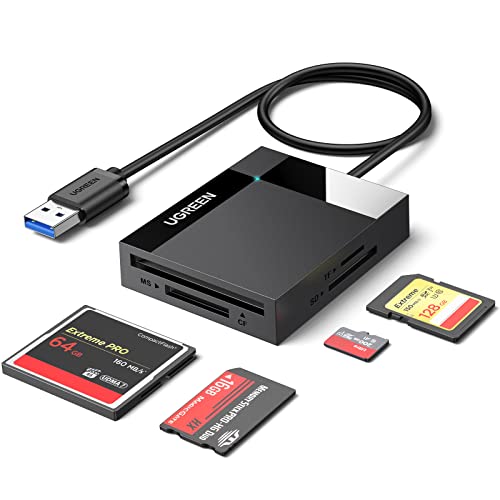
UGREEN USB 3.0 SD Card Hub Adapter
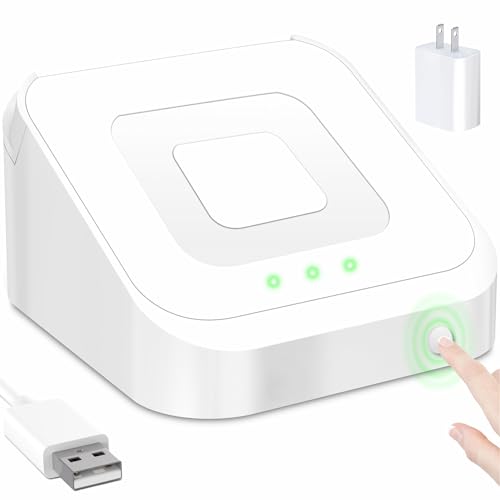
SORFHOUR Dock for Square Reader 2nd Gen

Togconn 7-in-1 USB 3.0 Memory Card Reader
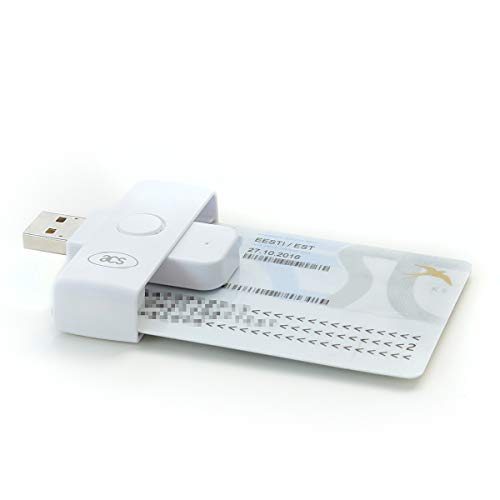
ACS ACR39U-N1 PocketMate II Smart Card Reader

Rocketek 2-in-1 NFC and CAC Smart Card Reader
A Deeper Look At The Lineup
The Identiv SCR3310V2 has earned a long track record in offices where DOD Common Access Cards and PIV credentials are part of the daily routine. It talks to almost any contact smart card you’d hand it, thanks to broad compliance with industry-standard protocols, and the USB full-speed interface keeps the read/write flow steady without driver headaches on most modern systems.
For federal contractors, IT admins rolling out credentialed logins, or anyone managing a small team’s secure access, this reader tends to be the kind of “set it and forget it” hardware that disappears into the desk. The shell feels built for years of plug-and-unplug cycles, which matters in shared workstations.
What Makes Sense
- Wide compliance with major smart-card standards, so it works across CAC, PIV, and many enterprise credential systems.
- Native OS support for Windows, macOS, Linux, and Android cuts down on driver hunting.
- Durable housing that holds up to daily insertion cycles in busy shared environments.
- Steady read/write performance, fine for routine logins and form signing without lag.
Things To Consider
- USB-A only, so users on newer USB-C laptops will need a dock or adapter.
- Contact-card only, with no NFC tap support for newer contactless badges.
Feature Snapshot
Who It Suits Best
IT-managed offices and government contractors running CAC or PIV authentication on standard USB-A workstations.
Where Another Pick Suits Better
Users on USB-C-only laptops should look at the Identiv SCR3310v2.0 USB-C Smart Card Reader, which skips the adapter entirely.
The SCR3310v2.0 keeps everything that made the original SCR3310V2 a staple in federal and enterprise settings, then trades the USB-A plug for a native USB-C connector. For anyone whose daily machine is a modern MacBook, a thin Windows ultrabook, or a Chromebook, that single change removes the dongle pile from the desk.
It carries the same broad compliance profile and cross-OS support, so it drops into credential workflows without forcing an IT refresh. The trade-off shows up in environments still running older Type-A hardware, where an adapter becomes necessary again.
Features That Help
- USB-C native plug means no adapter on modern laptops and tablets.
- Same wide smart-card support as the proven SCR3310 line.
- Cross-platform driver coverage that mirrors the USB-A sibling.
Worth Noting
- Contact-only design, with no NFC tap option for contactless credentials.
- Less useful at desks still standardized on USB-A ports.
Right Fit For
Mobile professionals and remote staff using USB-C-only laptops for CAC or PIV logins.
Look Elsewhere When
Folks who need both contact and contactless support should consider the Rocketek 2-in-1 NFC and CAC Smart Card Reader instead.
This is less a reader and more a survival kit for the reader you already own. The Aenllosi hard case wraps around the Square contactless and chip reader plus its dock, cushioning the kind of drops that happen at farmers’ markets, food trucks, and craft fairs. The rigid shell and hand strap keep the device close when the line is long and the counter is small.
The case fits the Square reader snugly, which means a vendor can toss it in a bag between events without worrying about scuffs or pressure cracks. Compared to the bare reader, it adds bulk, though, so anyone carrying it in a tight apron pocket will notice the difference.
A Few Highlights
- Hard outer shell cushions drops that would otherwise crack a payment screen.
- Waterproof and heat-resistant build for outdoor stalls and sunny counters.
- Built-in hand strap reduces fumbles during a rush.
Minor Gripes
- Adds noticeable size, so pocket carry becomes less comfortable.
- Only fits the specific Square contactless reader and dock combo, not other payment brands.
Made For
Pop-up vendors, market sellers, and small business owners carrying a Square reader to every event.
Skip It When
Counter-based shops with a stationary setup may prefer the SORFHOUR Dock for Square Reader 2nd Gen, which keeps the device powered in one place.
The SmartQ C368 is a travel-friendly memory card reader that handles the four most common card formats without dragging along a driver disc. It plugs into a laptop’s USB-A port, lights up softly, and starts reading SD, microSD, Memory Stick, and CompactFlash cards the moment it’s connected. Photographers moving from shoot to airport to hotel room will appreciate not having to install software on every borrowed machine.
USB 3.0 speeds keep large RAW imports moving, and the cable design tucks neatly into a camera bag pocket. It does require a USB-A port, which means newer laptop owners may need a hub nearby.
Practical Advantages
- True plug-and-play behavior across Windows and macOS, no software install needed.
- USB 3.0 transfer speed for fast offloads of high-resolution photo and video files.
- Four-slot design covers SD, microSD, MS, and CF in one compact body.
Honest Caveats
- USB-A connection only, so USB-C-only laptops need a hub or adapter.
- Cable is short by design, which helps travel but limits reach on a deep desk.
Best Suited To
Traveling photographers and videographers who need a no-fuss card reader across multiple machines.
Not Your Match When
Studio editors juggling many cards at once may prefer the UGREEN USB 3.0 SD Card Hub Adapter, which reads four cards simultaneously.
The UGREEN hub treats card reading like a small server, accepting up to four cards at once and moving data at USB 3.0 speeds. For a studio editor importing a wedding shoot, or a backup routine that touches SD, microSD, CF, and Memory Stick in one pass, that parallelism saves real time. Each slot runs independently, so nothing has to finish before the next card starts.
It’s a desk-dweller rather than a pocket piece, given the integrated cable and chunkier body. That footprint pays off in steady throughput, but the case does pick up scuffs on a shared workbench.
Key Advantages
- Reads and writes four cards at the same time, cutting multi-card imports dramatically.
- Broad format support including SDXC, CF, MS, and UHS-I cards.
- USB 3.0 throughput keeps large video files moving without bottlenecks.
Points To Note
- Larger footprint makes it less convenient for travel than the SmartQ C368.
- Plastic shell shows wear faster than metal-bodied readers on a busy desk.
Feature Rundown
Who Will Love This
Studio editors, wedding photographers, and content creators running parallel card imports every week.
Another Choice May Suit
Travelers who only ever offload one card at a time will find the SmartQ C368 USB 3.0 Multi-Card Reader easier to pack.
The SORFHOUR dock is the kind of accessory a busy café counter earns in its first week. It holds the Square Reader 2nd generation upright, charges it through a dedicated cable and wall charger, and adds an anti-sleep button so the device stays awake between taps. For staff ringing up back-to-back customers, that means fewer “device offline” apologies mid-transaction.
The dock is dock-only, which catches a few first-timers off guard since the reader itself isn’t included. The anti-slip base keeps the stand planted on glossy counters, and the included charging kit removes a separate accessory purchase.
What Works In Its Favor
- Anti-sleep button keeps the reader ready for the next tap without manual waking.
- Anti-slip base holds steady on smooth retail counters.
- Bundled cable and wall charger remove the need for a separate power accessory.
Softer Spots
- Reader sold separately, which has led to common returns from shoppers who missed that detail.
- Only fits the Square Reader 2nd generation, not the original Square reader.
Perfect Match For
Coffee shops, boutiques, and salons running a stationary Square checkout throughout the day.
Reach For A Different Pick When
Mobile sellers carrying the reader to events will get more use from the Aenllosi Hard Case for Square Reader.
The Togconn 7-in-1 is built for the household or studio where old and new cameras live side by side. It accepts SD, microSD, MS, CF, MMC, XD, and the usual SDHC/SDXC variants, and reads up to seven cards simultaneously over USB 3.0. The included USB-A and USB-C to Micro-B 3.0 cables cover most modern machines without a separate adapter.
It feels like a small data hub on the desk, with the trade-off being extra cable clutter. For anyone juggling a drawer of older cards, though, the format coverage removes the “will this work?” guesswork.
Good Reasons To Consider
- Seven slots cover nearly every consumer card format, including older XD and MMC types.
- Simultaneous read/write across all seven slots speeds up bulk imports.
- Two cable options (USB-A and USB-C) included for cross-device flexibility.
Room For Improvement
- Desk footprint and dual cables add clutter compared to single-cable readers.
- Plastic housing picks up scuffs in shared workspaces.
Quick Facts
Who Should Grab It
Multi-camera households and archive curators who need to read everything from a CF card to an XD card without swapping adapters.
A Better Fit Elsewhere
Photographers working with one or two modern card types will find the UGREEN USB 3.0 SD Card Hub Adapter simpler to live with.
The PocketMate II lives up to its name, sliding into a shirt pocket or laptop sleeve without adding bulk. It’s a contact smart card reader aimed at government, military, and enterprise CAC use, handling DOD CAC, national ID, and a long list of credential platforms once the right middleware is in place. For field staff who need to log in from a hotel desk or a deployment site, the size matters more than the spec sheet suggests.
There’s no NFC, so contactless badge workflows aren’t part of the picture. Within its contact-only lane, however, it covers the common credential types without drama.
The Practical Payoff
- Truly pocketable form factor that travels well between sites.
- Reads most contact chip smart cards used in government and enterprise settings.
- Broad support for DOD CAC platforms and national ID schemes.
Trade Offs
- No NFC support, so contactless badges need a different reader.
- Depends on third-party middleware and card service software for full functionality.
Feature Card
Built With In Mind
Government employees, contractors, and field staff who need CAC authentication on the go.
Swap It Out When
Shops handling both contact and contactless credentials should look at the Rocketek 2-in-1 NFC and CAC Smart Card Reader.
The Rocketek reader closes the gap that contact-only models leave open. It handles both contact chip cards and contactless NFC cards, so a single device covers CAC logins, ID badge taps, and bank chip card reading. The built-in USB-C plug suits modern laptops, and the included USB-A adapter covers older machines without buying extra accessories.
It’s a flexible pick for mixed environments where some staff carry contact CAC cards and others tap NFC badges. The shell feels solid in the hand, and compatibility with PC/SC, CCID, EMV, and Microsoft WHQL keeps it in line with mainstream credential software.
Everyday Wins
- Dual contact and contactless support covers CAC, ID, and bank chip cards in one device.
- Built-in USB-C plus USB-A adapter works across new and older machines.
- Broad standard support including ISO 7816, ISO 14443, PC/SC, CCID, and EMV.
Things To Weigh
- Contactless range is short, so cards need to land close to the reader for reliable reads.
- Full functionality depends on the third-party credential software already in your stack.
Spec Overview
Whose Shelf It Belongs On
Offices, clinics, and admin desks where staff carry a mix of contact and contactless credentials.
Consider Something Else When
Pure contact-card environments with no NFC need will find the ACS ACR39U-N1 PocketMate II more pocket-friendly.
What To Weigh Before Choosing a Card Reader
The first fork in the road is contact versus contactless. Contact readers, like the Identiv SCR3310V2 and the ACS PocketMate II, require inserting a card and dominate government and enterprise CAC workflows. Contactless NFC readers, like the Rocketek 2-in-1, let users tap a card or badge, which speeds up high-traffic checkouts and modern ID environments.
Connection type matters more than most people expect. A USB-A reader on a USB-C-only laptop means hunting for a hub or adapter every time, which adds friction in mobile setups. Native USB-C, like the Identiv SCR3310v2.0 or the Rocketek, removes that step and tends to feel more future-proof for newer machines.
Format and software fit are the quieter dealbreakers. Smart card readers depend on middleware, browser support, and credential software already on the machine, so checking PC/SC, CCID, and EMV compliance before buying saves an afternoon of troubleshooting. For photo and video work, the card format list (SD, microSD, CF, MS, XD) and simultaneous slot count decide whether a workflow feels smooth or constant.
Key Considerations Across These Picks
Pitfalls Shoppers Hit
A common slip is buying a reader that only handles one card family, then discovering the office uses a different one. CAC and PIV environments lean on contact smart cards, while newer ID badges often use NFC, so single-mode readers can leave you stuck halfway through a migration. Another easy miss is the connection type, where a USB-A purchase on a USB-C-only laptop turns into a hub scramble.
Where The Extra Money Goes
Higher-tier picks tend to add dual contact and contactless support, a more durable shell, and bundled cables or adapters that would otherwise be separate purchases. The Rocketek 2-in-1, for instance, earns its place by covering both card types and shipping with a USB-C-to-USB-A adapter, so the upgrade pays off in mixed credential environments. In a single-format, single-machine setup, the premium adds less value, and a focused reader like the PocketMate II handles the job for less.
Frequently Asked Questions
What Is The Difference Between Contact And Contactless Card Readers?
Contact readers require inserting a card into a slot, which is common for CAC, PIV, and bank chip cards. Contactless readers use NFC to read a card or badge held near the device, which speeds up taps and reduces wear on the card.
Do These Readers Work With Both Windows And Mac?
Most modern smart card readers, including the Identiv and Rocketek models, support Windows, macOS, and Linux. Always confirm the specific OS list on the product page before buying, especially for older operating systems.
Can One Reader Handle Both Smart Cards And Memory Cards?
Generally no. Smart card readers handle credential cards like CAC and PIV, while memory card readers handle SD, microSD, CF, and similar storage cards. A device like the Rocketek 2-in-1 covers both contact and contactless smart cards, but not memory cards.
Do I Need Special Software To Use A Smart Card Reader?
Yes, in most cases. Smart card readers rely on middleware and credential software such as ActivClient or platform-specific login tools, and they rarely work standalone. The hardware is only half of the equation.
Are Contactless Card Readers Safe For Payments?
Contactless payment readers use encrypted tap transactions and tokenization, which keeps card data safer than a swipe in many setups. For business use, pairing the reader with a trusted payment platform adds another layer of protection.
Final Verdict
The right contactless card reader depends on the cards in play and the machines they’re connecting to. Government and enterprise users handling CAC and PIV cards will feel at home with the Identiv SCR3310V2 or its USB-C sibling, while mixed credential environments get the most flexibility from the Rocketek 2-in-1. Photographers and studios should weigh the UGREEN hub or Togconn 7-in-1 against their card drawer, and small business owners running Square will find the SORFHOUR dock and Aenllosi case cover the two ends of their day. Match the reader to the card type first, the connector second, and the rest tends to fall into place.


