

Picking up a payment device is one of those decisions that quietly decides how smoothly your day runs. A reliable terminal turns a rushed coffee order into a quick tap, while a clunky reader makes every checkout feel like a long wait. The credit card machines for small business in this list cover cashiers at fixed counters, mobile pros ringing people up at the table, and unattended vending setups where nobody is watching the screen at all.
A Fast Comparison Of The Options

Sliner 200 Pcs Card Reader Cleaning Cards, CR80 Dual Sided

Square Terminal Mobile POS Card Reader

WAIYUCN Hard Case for Square Handheld (Gray)
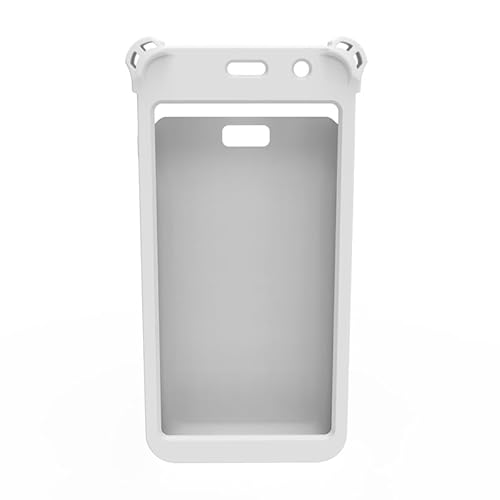
Ventalia White Silicone Case for Pax A77

Square Handheld Portable POS Terminal

CRIZISTON POS Terminal Stand for Pax A80

TCN 60-Slot Refrigerated Vending Machine
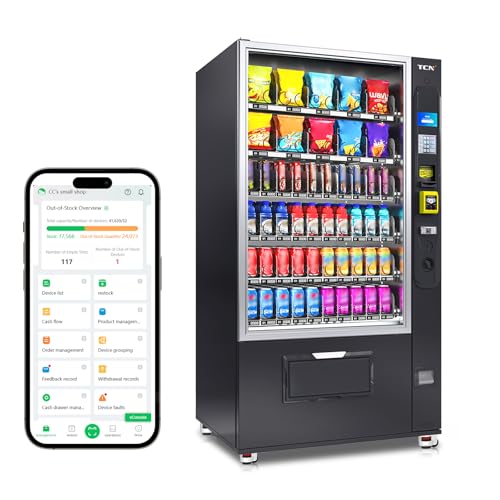
TCN Combo Vending Machine, 60 Selections

CRIZISTON POS Stand for Pax A920/A920 Pro
A Closer Look At Each Pick
Before you reach for a brand-new terminal, the smallest upgrade in this roundup might save you the trouble. Sliner’s CR80-format cleaning cards slot into swipe and insert readers the same way a real card does, wiping away the dust and pocket lint that quietly gum up the magnetic head over time.
You benefit most if you run more than one reader across a busy week, since a 200-card pack lasts through months of routine swipes. It’s the unglamorous step most owners forget until cards start failing at the worst moment.
What Helps Most
- Standard CR80 sizing fits the majority of mag-stripe and chip-reading hardware in small shops.
- Two-sided design cleans both the swipe path and chip slot in a single pass.
- Bulk count of 200 cards supports regular maintenance without constant reordering.
- Helps extend the working life of older terminals by reducing read errors over time.
Things To Consider
- Cleaning cards only address the reader itself, not network or software glitches on your terminal.
- You’ll still need to follow the reader maker’s own cleaning schedule to avoid voiding any service plan.
Key Product Details
Best Suited To
Shops with several readers that want a low-cost way to cut down on swipe failures and extend terminal life.
Swap It Out When
You don’t yet own a reader, in which case the Square Terminal is a better starting point than a cleaning accessory.
Square’s countertop terminal is the workhorse most small shops picture when they think of a modern register. It combines a touchscreen, receipt printer, and card reader in one slab, so the cable clutter behind your counter shrinks to a single power lead.
Where the cleaning cards above protect hardware you’ve already bought, this unit replaces a tangle of separate devices. Cafés, boutiques, and salons with a fixed checkout line tend to get the most out of it, since staff can hand the terminal to a customer without leaving the counter.
Points In Its Favor
- Built-in receipt printer removes the need for a separate add-on.
- Accepts tap, chip, and swipe in a single device, useful for older gift cards still in circulation.
- Designed to integrate with Square’s retail, restaurant, and appointments software if you grow into those tools.
- Counter-sized footprint suits tight registers where a tablet plus separate reader won’t fit.
Trade-Offs
- It stays put, so curbside pickup, market stalls, and tableside service will want a different pick.
- You’ll commit to Square’s ecosystem for processing and software, which limits mixing in other point-of-sale apps.
- Some owners add a protective case and a mount after a few months of shared use.
Who It Suits Best
Brick-and-mortar shops with a single checkout counter who want one tidy unit instead of a tablet, reader, and printer stack.
A Better Fit Elsewhere
Mobile sellers who move from table to table are better served by the Square Handheld, which keeps the same software feel in a pocketable body.
The Square Handheld is built to follow you around, which is exactly when accidents happen. WAIYUCN’s carrying shell wraps a hard EVA shell around the device, so a slip off a delivery car seat or a knock against a metal counter doesn’t end your shift.
You pair this case with the Square Handheld covered later in the list. The interior is shaped specifically for that model, so there’s no wiggle room for the screen or charging port to shift on impact.
Good Reasons To Consider
- Rigid EVA exterior absorbs everyday bumps during car trips between venues.
- Soft interior lining keeps the touchscreen free of scuffs when sliding in and out.
- Compact form slips into an apron pocket, messenger bag, or back-of-house drawer.
- Gray color hides smudges from a long day of handling better than a light finish.
Points To Keep In Mind
- It’s shaped for the Square Handheld specifically, so it won’t double as storage for a Square Terminal or a tablet.
- Adding a case means the device gains a little bulk in the hand, which some servers may notice.
Perfect Match For
Mobile sellers who carry the Square Handheld in a bag, car, or apron and want a sensible buffer against drops.
Skip It When
You mostly work from a single counter, where the Square Terminal and a fixed stand like the CRIZISTON mount make more sense.
Silicone skins live or die on the fit, and Ventalia’s cover is cut specifically for the PAX A77. The buttons, charging port, and contactless zone all stay accessible, so wrapping the device doesn’t slow down a cashier mid-rush.
Where the WAIYUCN hard case above suits a mobile worker, this one is friendlier at a busy counter where the A77 gets passed from hand to hand. The textured silicone gives a tired cashier something grippy to hold during a long shift.
The Helpful Details
- Precise cut-outs leave the touchscreen, ports, and payment zones fully usable.
- Flexible silicone absorbs minor knocks during handoff between staff and customer.
- Textured grip surface helps reduce drops during quick transactions.
- White finish matches the look of most modern retail counters without clashing.
Small Caveats
- Silicone picks up dust and lint from apron pockets and may need an occasional wipe-down.
- It’s only compatible with the PAX A77, so anyone running a different PAX model should look at the A920 stand instead.
Feature Snapshot
Whose Shelf It Belongs On
Any small business running the PAX A77 as a fixed or mobile terminal who wants a softer layer between the device and a busy day.
Not Your Match When
You’re running a PAX A920 or A920 Pro, where the CRIZISTON A920 stand is a smarter add-on than a model-specific skin.
Take the Square Terminal and shrink it until it fits in an apron pocket, and you get the Handheld. It runs on a built-in battery so a server can take an order, scan a code, and ring up a card at the table without ever leaving the customer’s side.
Restaurants, food trucks, mobile salons, and beauty pros all hit the same wall with a fixed terminal: the line. You spend the savings on this pocketable reader the first time a customer doesn’t have to walk to the register.
Benefits That Matter
- Pocketable form factor cuts down the trip between a table and the front counter.
- Built-in barcode scanner supports tableside ordering and price checks in one step.
- Battery-powered design runs through long shifts without hunting for an outlet.
- Same Square software family as the Terminal, so training is short if you already use Square.
Less-Strong Areas
- Smaller screen than the countertop Square Terminal, which can slow down complex checkouts.
- You’ll want a hard case like the WAIYUCN option above to keep it safe during a busy day on the floor.
Quick Facts
Right Fit For
Servers, mobile service pros, and retailers who walk the floor and want to bring the checkout to the customer.
Look Elsewhere When
Your checkout line is the main event, since the full Square Terminal gives you a bigger screen and a built-in printer for that setup.
Counter space is the most expensive square footage in a small business, and a PAX A80 lying flat invites spills. CRIZISTON’s stand lifts the terminal off the counter on a 7-inch pedestal that swivels and tilts so customers and cashiers can both see the screen.
You pair this stand with a fixed counter setup, much like the Square Terminal covered earlier, except with the A80’s separate hardware footprint. The swivel range saves a few seconds per transaction, which adds up across a busy lunch rush.
The Good Stuff
- 7-inch height brings the screen closer to eye level for both staff and shoppers.
- Swivel motion lets the customer face the screen during chip and tap transactions.
- Sturdy frame keeps the A80 planted during swipes, taps, and PIN entries.
- Raises the terminal above spills, crumbs, and countertop clutter.
Factors To Consider
- It’s a fixed stand, so it doesn’t help if your checkout moves around the shop during the day.
- Only matches the PAX A80, so an A920 shop should jump to the matching CRIZISTON stand below.
Built With In Mind
PAX A80 owners with a fixed register who want a tidier counter and a friendlier angle for customers.
Reach For A Different Pick When
You’re running the larger PAX A920 or A920 Pro, in which case the taller CRIZISTON stand at the end of this list is the closer match.
Stepping away from the cashier desk, TCN’s refrigerated vending unit is the bigger swing of the roundup. A 22-inch touchscreen walks a customer through a purchase, while a built-in card reader plus bill and coin acceptor cover anyone who walks up without a wallet app.
Offices, gyms, schools, and hotel staff areas are the natural home for this unit. Nobody staffs the counter, so the remote management system does the watching for you, flagging when a slot empties or a temperature drifts.
Practical Advantages
- 22-inch touchscreen makes the buying process clear without on-site staff.
- Refrigerated interior keeps drinks and perishable snacks at a safe temperature.
- Triple payment options, including tap, swipe, and physical cash, fit different crowds.
- Remote management lets you check stock and sales without driving to the machine.
Honest Caveats
- It’s a major capital purchase, so you’ll want a clear foot-traffic plan before committing.
- You’ll need power and a stable spot for refrigeration to run reliably around the clock.
Key Attributes
Who Will Love This
Operators with steady foot traffic in offices, hotels, schools, or gyms who want unattended sales without giving up cold drinks.
Where Another Pick Suits Better
You only need ambient snacks or a smaller footprint, in which case the TCN combo unit covered next keeps things simpler and lighter on the budget.
The sibling to the refrigerated TCN above drops the chill and boosts the payload. The combo unit stocks around 380 items across 60 product slots, mixing chips, candy, and canned drinks in one cabinet for break rooms and lobbies.
Where the touchscreen fridge targets offices that need cold drinks, this version fits warehouses, factory floors, and waiting areas where ambient snacks are the main draw. Fewer moving parts and no compressor also make it easier to live with in a noisy back hallway.
Positive Points
- Around 380-item capacity stretches the time between restocking runs.
- Flexible slot layout lets you swap between chips, candy, and canned drinks as tastes change.
- Cashless payment sits alongside bills and coins for shoppers without a card.
- Smart remote management helps spot empty slots from across town.
Some Limits To Know
- It doesn’t refrigerate, so cold drinks aren’t part of the lineup.
- Foot traffic and a sturdy installation spot still decide whether the unit earns its keep.
Made For
Larger break rooms, warehouses, and waiting areas that need to feed a crowd between shifts without a fridge on site.
Consider Something Else When
Cold drinks are a major part of your sales, since the refrigerated TCN unit earlier handles that side of the menu.
The PAX A920 and A920 Pro are heavier tablets than the A80, and they need a sturdier perch. CRIZISTON’s taller stand uses a metal frame to keep the larger device planted, with a wide swivel and tilt range so customers can angle the screen their way.
You can think of this as the older sibling to the A80 stand covered earlier. The motion range is the same, but the frame is sized for the A920’s bigger footprint, which matters when a busy cashier keeps grabbing the screen mid-shift.
Noteworthy Benefits
- 7-inch height matches the A80 stand so the counter line looks consistent.
- Wide swivel range lets a customer face the screen during tap and PIN entry.
- Sturdy metal frame handles the A920’s extra weight without wobble.
- Tilt range supports both cashier and customer viewing angles without moving the base.
A Few Limitations
- It’s tied to the A920 and A920 Pro, so A80 shops should pick the smaller stand above.
- A fixed stand anchors your checkout to one spot, which doesn’t help roaming carts or pop-up events.
Feature Snapshot
The Right Fit
Shops running the PAX A920 or A920 Pro at a fixed counter who want a sturdier, more flexible mount than a basic cradle.
Another Choice May Suit
Mobile sellers should skip the stand entirely and pick up the Square Handheld with the WAIYUCN hard case for a checkout that moves with them.
What To Weigh Before Picking A Payment Terminal
Buying a credit card machine is less about the box and more about the day you’ll live with it. Counter space, foot traffic, and the way your staff actually move around the shop shape the right answer more than any spec sheet.
Match The Terminal To The Checkout Layout
Counter space tends to disappear faster than you expect, so a single integrated unit like the Square Terminal beats a separate tablet, reader, and printer stack in tight shops. If your checkout moves from table to table, however, the Square Handheld keeps the same software in a pocketable form, which matters more than screen size.
Decide Between Stationary and Movable Mounts
A fixed stand like the CRIZISTON PAX A920 stand gives you a clean angle for the customer and saves a tired cashier’s wrists. Mobile sellers will rarely get the most of a swivel base, so a hard case and a comfortable grip cover the real risks instead. Match the mount to the route, not the other way around.
Plan For Maintenance Before You Need It
Magnetic heads and chip slots collect debris no matter how careful your staff are, which is where cleaning cards like the Sliner CR80 pack quietly earn their keep. A small monthly habit beats a panicked service call when the reader starts failing at peak hour.
Think About Unattended Setups Carefully
Vending units from TCN turn a corner of a break room into a tiny revenue stream, but they also demand power, ventilation, and a steady crowd. Run the numbers on foot traffic before you commit to a refrigerated touchscreen or an ambient combo unit.
Key Considerations Across These Picks
A few patterns repeat across this category, and spotting them early saves a wasted return.
Pitfalls Shoppers Hit
The classic slip is buying a beautiful countertop terminal for a checkout that never sits still, then watching it sit unused in a drawer. The opposite mistake is grabbing a pocketable reader for a high-volume register, then realizing the small screen slows down a steady line. Match the form to the actual route your staff take during a normal rush.
Where The Extra Money Goes
Premium hardware tends to spend its budget on durability, screen quality, and longer battery life rather than raw payment features, since every terminal here accepts the same major card networks. The CRIZISTON stands feel sturdier because of the metal frame, and the Square Terminal costs more than a basic reader because the printer and screen live inside. You’ll feel the difference on day one hundred, not day one.
Frequently Asked Questions
Do I Need A Separate Reader If I Already Use A Phone?
A phone with a tap-to-pay app handles the occasional sale fine, but a dedicated terminal speeds up repeat transactions and supports chip cards and printed receipts. You’ll find the difference shows up most during a rush, when every dip and tap has to clear fast.
Are Cleaning Cards Worth The Extra Step?
Regular swipe-path cleaning extends the working life of mag-stripe and chip readers, especially in shops where the same device handles hundreds of cards a week. Owners commonly find that a quick monthly wipe reduces the read errors that crop up at the worst times.
Can A Stand Really Speed Up Transactions?
A stand that swivels and tilts lets a customer angle the screen during tap and PIN entry, so the cashier doesn’t hand the device across the counter. Across a busy shift, the saved seconds add up to a shorter line.
How Does An Unattended Vending Machine Stay Stocked?
Smart vending units from brands like TCN push sales and stock data to a remote dashboard, so an operator can see which slots are running low without driving to the machine. You still have to refill in person, but the trips get planned instead of reactive.
What Should I Look For In A Portable Reader?
Battery life, a pocketable weight, and a hard case tend to matter more than peak processing speed for mobile sellers. The Square Handheld covers the basics, and pairing it with a case like the WAIYUCN option keeps it safe between stops.
The Takeaway
Start with where the checkout actually happens in your shop, then match the terminal, mount, or vending unit to that reality. Counter work calls for an all-in-one reader like the Square Terminal, mobile service calls for the Square Handheld, and unattended setups call for a TCN vending machine. Pick the right shape first, and the rest of the details tend to fall into place on their own.


