

Paper-like screens have quietly grown up. What started as a niche for bookworms is now a broad category covering color comics, distraction-free note-taking, full Android apps, and stylus workflows that genuinely replace a notebook. The right choice depends on whether you mostly read, mostly write, or bounce between both, plus how much color and app freedom you actually need.
The picks below cover compact 7-inch readers, large 10.3-inch notebooks, one color E Ink slate, and one paper-feel LCD alternative that stretches the definition a little. Every one is matched to a specific reading or writing style.
The Leading Options At A Glance

Kobo Libra Colour eReader (White)
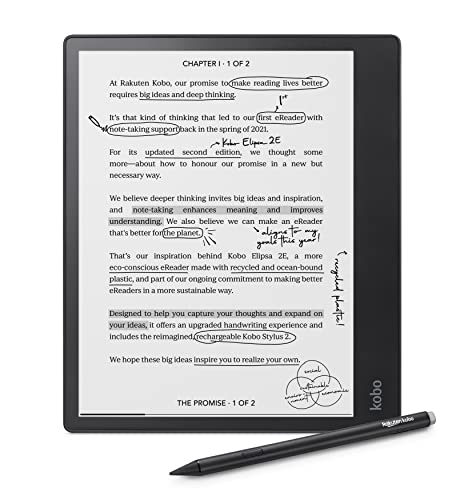
Kobo Elipsa 2E eReader with Stylus 2

Kobo Libra Colour eReader (Black)

Ocean 7″ E Ink Tablet with Handwriting

TCL Note A1 NXTPAPER 11.5″ Tablet

Penstar eNote2 E-Ink Notebook with Pen

reMarkable 2 with Marker Plus Bundle
More On The Choices That Made The List
The Libra Colour is the rare e-reader that genuinely splits the difference between books and productivity. Its 7-inch glare-free panel uses Kaleido 3 (a color-filter layer stacked on standard E Ink) so comics, magazine spreads, and color-coded highlights actually show their hues, while black-and-white text stays sharp for plain reading sessions. The asymmetric grip and physical page-turn buttons keep one-handed reading comfortable on long commutes, and the waterproof shell makes bath and pool reading worry-free.
You also get audiobook support, adjustable warm tones for night reading, and optional Kobo Stylus 2 compatibility for marking up PDFs and journaling. It feels like a focused reading device first, a notebook second, which is exactly what most people want from a color E Ink tablet.
The Value In It
- Color E Ink for covers, comics, and highlights without giving up text clarity
- Physical buttons and a textured grip cut hand strain on long sessions
- Waterproofing means pool, bath, and kitchen reading stay stress-free
- Audiobook support adds value for commuters who toggle between reading and listening
Honest Caveats
- Color saturation sits well below a tablet LCD, so it is not a photo viewer
- Stylus is sold separately, adding to total spend if you want handwriting
Key Specs
Made For
Heavy readers who want color for comics, cookbooks, or marked-up PDFs without giving up the calm of an E Ink screen.
Where Another Pick Suits Better
Writers and note-takers who want a larger canvas and bundled stylus will get more from the Kobo Elipsa 2E.
The Elipsa 2E trades portability for screen real estate, and that swap pays off for anyone living in PDFs and notebooks. Its 10.3-inch Carta E Ink panel shows roughly the same surface area as a paperback page, so academic articles, sheet music, and technical docs no longer feel cramped. ComfortLight PRO adjusts both brightness and color temperature, easing late-night reading sessions.
The Kobo Stylus 2 ships in the box, which is unusual for the category, and 32GB of storage swallows thousands of documents. The chassis uses recycled and ocean-bound plastic, a quiet win for environmentally minded shoppers.
Real Benefits
- 10.3-inch Carta E Ink screen fits full PDF pages without constant zooming
- Kobo Stylus 2 included, so handwriting and markup work out of the box
- 32GB storage holds a deep library of books and documents
- ComfortLight PRO adjusts both brightness and warmth for night reading
- Recycled-plastic build for shoppers who weigh material sourcing
Points To Note
- Larger size makes one-handed reading awkward compared to the Libra Colour
- Grayscale only, so color comics and highlights lose their pop
Whose Shelf It Belongs On
Researchers, grad students, and journalers who live in PDFs, markups, and long-form notes rather than short reading bursts.
Consider Something Else When
Travelers who want color and one-handed comfort will be happier with the Kobo Libra Colour.
The Black version of the Libra Colour is functionally identical to its white sibling, which is the point. You get the same 7-inch color E Ink Kaleido 3 display, the same asymmetric grip, the same physical buttons, and the same waterproof rating, just wrapped in a finish that disappears on a dark desk or nightstand.
For minimalist workspaces or frequent travelers who want a less flashy device, that aesthetic choice alone can justify picking it. It is the same calm, focused reader you already know about, with a quieter color palette on the outside.
Practical Advantages
- Same color E Ink panel as the white Libra for full reading flexibility
- Asymmetric grip and page buttons reduce one-handed fatigue
- Waterproofing for bath, beach, and kitchen use
- Matte black finish hides smudges and fits a minimalist aesthetic
Small Caveats
- No stylus in the box, so handwriting costs extra
- Color rendering remains muted compared with an LCD tablet
Best Suited To
Style-focused shoppers who want the Libra Colour experience in a darker, more discreet package.
Not Your Match When
Anyone who actually wants to write on the screen will find a better fit in the Kobo Elipsa 2E, which bundles the stylus.
The Ocean 7-inch breaks the mold by running Android on an E Ink screen, with an octa-core 2.2GHz chip, 4GB of RAM, and 64GB of storage. That gives it app freedom that locked-down readers cannot match. If your reading habits involve sideloaded apps, custom readers, or note-taking tools beyond the manufacturer’s default, this is the small-screen option that adapts.
Handwriting is supported through a compatible stylus, and the glare-free touchscreen handles brightness and color temperature adjustments for varied lighting. It is the most “open” 7-inch E Ink tablet on the list.
Notable Upsides
- Android OS opens the door to third-party reading and note apps
- 4GB RAM plus 64GB storage keeps a deep library and large notebooks local
- Octa-core processor keeps page turns and app switching responsive
- Handwriting support turns the same device into a pocket notebook
Trade Offs
- Bosper stylus is sold separately, so budget for handwriting
- More open OS means more setup and occasional app compatibility quirks
Quick Facts
Right Fit For
Tinkerers and app-heavy users who want E Ink comfort without giving up their existing Android workflow.
Look Elsewhere When
Pure readers who want a calmer, more locked-down experience will prefer the Kobo Libra Colour.
The TCL Note A1 stretches the E Ink concept by using NXTPAPER technology on an 11.5-inch, 2.2K LCD panel at 120Hz, paired with 8GB of RAM and 256GB of storage. That makes it less of a pure E Ink tablet and more of a paper-feel LCD tablet, but the visual goal is the same: glare reduction, a more book-like surface, and reduced eye strain during long sessions.
You also get full Android app compatibility, which means reading apps, productivity tools, and creative software all run natively. For document review, sketching, and split-screen work, the canvas size and storage headroom feel generous.
The Practical Payoff
- 11.5-inch 2.2K display with NXTPAPER for reduced glare and eye comfort
- 120Hz refresh rate keeps scrolling smoother than typical E Ink
- 8GB RAM plus 256GB storage supports heavy multitasking
- Android OS unlocks the same apps you already use on a phone
Less Ideal Details
- Not true E Ink, so battery life and outdoor readability differ from the category norm
- Large size is less travel-friendly than 7-inch readers
Built With In Mind
Designers, document reviewers, and multitaskers who want a large, paper-feel canvas with full app freedom.
A Better Fit Elsewhere
Readers who want true E Ink battery life and a calmer screen will be happier with the Kobo Elipsa 2E.
The Penstar eNote2 is built for people who treat notes like an archive. The 10.3-inch E Ink display removes the capacitive touch layer, which the manufacturer credits with sharper contrast and a more paper-like feel. Writing happens through a pressure-sensitive stylus with 8192 levels, enough nuance for sketches and detailed handwriting.
The headline spec is storage: 128GB holds years of notebooks and PDFs without leaning on cloud sync. A 6500mAh battery and bundled leather folio cover round out the package.
The Case For It
- 8192-level pressure sensitivity supports nuanced writing and sketching
- 128GB local storage keeps massive archives offline
- 6500mAh battery supports long sessions without daily charging
- Leather folio cover included for desk and travel use
Some Limits To Know
- Grayscale only, so visual-heavy notes lose information
- Heavier and thicker than a 7-inch reader, so portability takes a hit
Who Should Grab It
Heavy note-takers, researchers, and archivists who want offline storage and stylus precision in one device.
Skip It When
Color-loving readers and casual users will find the Kobo Libra Colour a more flexible everyday pick.
The reMarkable 2 is the most disciplined device on this list, by design. There is no app store, no notifications, and no social feed, just reading, writing, and reviewing documents on a paper-feel surface. At roughly 4.7mm thin, it slips into a bag almost like a legal pad, and the Basalt Book Folio adds protection without bulk.
The Marker Plus ships with the bundle, offering an eraser tip and tilt support for more natural handwriting. Battery life stretches up to about two weeks, which fits the way most people actually use a notebook: in focused bursts across days, not hours of streaming.
Everyday Advantages
- Distraction-free design removes notifications and app churn
- 4.7mm thin body travels easily in a bag or folio
- Marker Plus included for natural-feeling handwriting
- Up to two weeks of battery life for low-maintenance ownership
Things To Consider
- Grayscale E Ink only, so color content loses information
- Locked-down ecosystem means no third-party apps or sideloading
Perfect Match For
Writers, thinkers, and minimalists who want a calmer alternative to a glossy screen.
Reach For A Different Pick When
App-heavy users who want full Android flexibility will find the Ocean 7-inch E Ink Tablet a better fit.
How To Pick The Right E Ink Tablet
Match The Screen To The Job
A 7-inch E Ink panel is the sweet spot for reading. It fits a coat pocket, supports one-handed sessions, and handles text, comics, and color highlights without strain. A 10.3-inch panel shifts the trade-off toward PDFs, markups, and note-taking, where the extra surface area cuts zooming and gives handwriting room to breathe. Anything larger, like the TCL Note A1’s 11.5-inch panel, leans into document review and split-screen work, though it travels less comfortably.
Decide Between Color, Grayscale, And Paper-Feel LCD
Color E Ink (Kaleido 3) shows muted hues that work for covers, comics, and highlights, but cannot match an LCD for vibrancy. Grayscale Carta E Ink is sharper for text and supports finer stylus nuance. Paper-feel LCD tech, like TCL’s NXTPAPER, brings full color and faster refresh at the cost of battery life and outdoor readability. Match the screen tech to your dominant content.
Weigh Stylus And Storage
Bundled stylus support removes the most common hidden cost of E Ink notebooks. Pressure levels matter less for handwriting and more for sketching, where 4096 is fine and 8192 adds nuance. Storage matters more than people expect: 32GB holds a large library, 64GB supports app-heavy use, and 128GB is archive territory for years of notes and PDFs kept offline.
Lock Down The Ecosystem
Locked-down systems like Kobo and reMarkable reward focus and consistency but limit app freedom. Android-based E Ink tablets offer flexibility but trade some battery life and add setup overhead. For most shoppers, the ecosystem matters as much as the panel.
Key Considerations Across These Picks
Where Shoppers Go Wrong
A frequent stumble is chasing the biggest screen without thinking about how it gets used. A 10.3-inch or 11.5-inch tablet sounds appealing until it sits unused on a desk because it does not fit a commute. Another common slip is buying color E Ink for vibrant photo viewing; color E Ink is gentler than LCD, not brighter. Finally, hidden stylus costs catch many shoppers off guard, since several E Ink tablets ship without one in the box.
When Paying More Pays Off
Higher-tier models earn their price through bundled stylus support, larger storage, waterproofing, and stronger build materials. For daily commuters, bath readers, or heavy note-takers, those extras translate to real ownership comfort. For occasional readers, a basic locked-down reader delivers most of the experience without the premium.


