

Open-frame 3D printers have their place, but an enclosed chamber changes the calculus for most households and small studios. Enclosed designs keep curious hands away from hot nozzles, trap heat for cleaner prints with engineering filaments, and contain the small particles and noise that make desktop printing feel intrusive. The six machines below span a wide range of users, from a child-safe AI companion to industrial multi-material workhorses built for serious throughput.
The Picks In Brief

Magic Jimmy AI-Powered 3D Printer for Kids
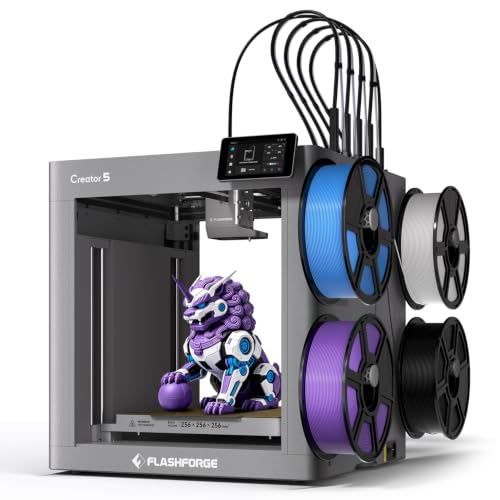
FLASHFORGE Creator 5 3D Printer 4 Toolheads

Original Prusa CORE One 3D Printer Kit

FLASHFORGE AD5X Multi-Material 3D Printer

FLASHFORGE AD5M Pro 3D Printer Dual Nozzle

FLASHFORGE Creator 5 Pro 3D Printer
Inside Each Recommended Option
Most enclosed 3D printers are aimed at adults, but this Magic Jimmy model flips the script for younger users. The chamber is fully sealed so little fingers stay clear of hot ends, moving axes, and pinch points, and the unit ships fully assembled so a parent does not need to break out a toolkit. Built-in AI tools let children turn sketches, text prompts, or photos into printable models, which takes the steep modeling-software hurdle off the table.
You will find this setup works best in supervised STEM sessions at home or in classrooms where kids can iterate quickly. The AI shortcuts mean less time fiddling with slicers and more time watching a creation come off the bed. Compared to the multi-material machines later on this list, the trade-off is creative depth, since the focus is clearly on fun and safety rather than material versatility.
Everyday Advantages
- Fully enclosed design keeps hot and moving parts away from children during operation.
- AI-assisted model creation removes the need to learn complex CAD software.
- Arrives fully assembled, so setup is mostly unboxing and a quick first print.
- Photo-to-figurine tools make personalized projects feel achievable for any age.
Things To Consider
- Not built for engineering filaments like ABS or polycarbonate that need higher chamber temperatures.
- AI models still need cleanup for complex prints, so some adult help is realistic.
Who It Suits Best
Parents and teachers introducing children ages roughly 8 and up to 3D printing in a safe, guided setting.
Where Another Pick Suits Better
Adults who want multi-color, high-speed production should look at the FLASHFORGE AD5X instead.
The Creator 5 is built for makers who would rather print than purge filament. Instead of loading and unloading spools every color change, four toolheads swap in around seven seconds, so a multi-material job feels closer to a single continuous print. Wrapped in a CoreXY motion platform (a layout where the print head rides on a fixed gantry driven by crossed belts, trading weight for speed) rated up to 600 mm/s, the unit keeps the throughput high without the open-frame mess of an older hobbyist setup.
Where the Magic Jimmy prioritizes safety for kids, this machine prioritizes workflow for grown-up hobbyists. Auto bed leveling and smart extrusion reduce the trial-and-error tuning that eats into a weekend project. You may find the multi-color capability genuinely changes what you decide to print, since complex visual models no longer require manual filament swaps.
Benefits That Matter
- Toolhead-swapping design slashes wasted filament compared to single-nozzle color systems.
- CoreXY motion platform supports high travel speeds without obvious quality loss on standard prints.
- Auto bed leveling removes a routine calibration chore before every job.
- Enclosed chamber helps maintain stable temperatures for cleaner ABS and PETG results.
Points To Note
- Four toolheads add mechanical complexity that may need occasional cleaning and inspection.
- Larger footprint than a single-extruder enclosed printer, so plan bench space accordingly.
Feature Snapshot
Right Fit For
Hobbyists and small-studio makers who run multi-color prints regularly and want a faster, less wasteful workflow.
Consider Something Else When
Users who need active chamber heating for demanding engineering filaments should consider the FLASHFORGE Creator 5 Pro.
Prusa has a long-standing reputation for machines that stay useful for years, and the CORE One kit leans into that lineage. It ships disassembled as a DIY build, which doubles as a learning exercise, and automatic calibration helps new users avoid the usual first-week headaches. The enclosed CoreXY chamber houses a roughly 250 x 220 x 270 mm build volume, a comfortable size for household parts, cosplay props, and functional prototypes.
For a household printer you plan to keep on a workbench for the long haul, the removable print sheets and active Prusa community are real practical advantages. Compared to the FLASHFORGE AD5M Pro later in this list, the CORE One feels more like a daily workhorse and less like a high-speed sprinter. A filament sample is included, so you can run a test print the same day you finish assembly.
Strong Points
- DIY assembly doubles as a learning experience and a chance to know the machine inside out.
- Enclosed CoreXY chamber supports higher-quality prints with engineering materials.
- Removable print sheets simplify part removal and bed maintenance over time.
- Automatic calibration lowers the barrier for first-time Prusa owners.
Worth Bearing In Mind
- Build time during assembly can run several hours, which is not for every schedule.
- Print speed sits below the 600 mm/s class machines in this roundup.
Key Attributes
Whose Shelf It Belongs On
Hobbyists and educators who want a long-life, repairable enclosed printer and enjoy a weekend assembly project.
Not Your Match When
Shoppers who want a multi-color out-of-box experience should look at the FLASHFORGE AD5X Multi-Material 3D Printer.
The AD5X brings four-color printing into a more compact enclosed frame than the larger Creator series. It hits up to 600 mm/s with 20,000 mm/s² acceleration, which is the kind of speed that makes long jobs feel shorter. Full-auto calibration and a filament backup system help avoid the “ran out of filament at hour six” disaster, while DIY IFS (interchangeable filament switcher) creations open the door to custom material configurations.
Where the Prusa CORE One focuses on longevity and single-color reliability, the AD5X is a productivity play for creators who care about vivid, multi-color output. The enclosed design also keeps the chamber warm enough for cleaner results on materials like PETG. For a small Etsy-style business or a maker who runs batches, the color throughput is the headline feature, and the rest of the machine is built to support it.
Where It Delivers
- Four-color capability in a relatively compact enclosed footprint.
- Filament backup feature keeps long jobs from failing mid-print when a spool runs dry.
- Full-auto calibration makes start-up and bed tuning nearly hands-off.
- High acceleration supports faster job turnaround for batch creators.
Trade-Offs
- Multi-color workflow can introduce purge artifacts on intricate models, depending on the slicer settings.
- IFS module expands the printer’s maintenance footprint compared to a single-extruder unit.
Feature Card
Best Suited To
Small business owners and serious hobbyists running multi-color, multi-material projects in a home or studio space.
Look Elsewhere When
You need a printer for kids or classroom use, where the FLASHFORGE AD5M Pro or Magic Jimmy AI model would be a better fit.
The AD5M Pro leans into the “printer in a living space” angle. Its enclosed CoreXY frame and auxiliary chamber cooling keep standard-mode operation at or below 50 dB, with an additional low-speed silent mode for late-night jobs. The bundle ships with both 0.4 mm and 0.6 mm nozzles, so you can swap between fine detail and faster, thicker extrusion without buying extras. Full-auto calibration removes the usual first-time tuning ritual.
Compared to the AD5X, this is the simpler, quieter sibling for someone who does not need four colors. A built-in camera also makes remote monitoring practical when the printer is running in another room. Depending on your household, the low noise floor alone may be the reason this lands on the shortlist.
Good Reasons To Consider
- Quiet operation at or below 50 dB in standard mode makes it apartment-friendly.
- 0.4 mm and 0.6 mm nozzle bundle offers genuine flexibility out of the box.
- Full-auto calibration trims setup time for newer users.
- Built-in camera supports remote monitoring of longer prints.
Less-Strong Areas
- Lacks the multi-color throughput of the AD5X and Creator 5 Pro models.
- Auxiliary cooling fans need occasional cleaning to maintain that low-noise performance.
Who Will Love This
Home office users, apartment dwellers, and parents who want an enclosed printer that does not dominate the room.
Another Choice May Suit
Multi-color batch creators will get more mileage from the FLASHFORGE Creator 5 Pro.
The Creator 5 Pro is the industrial-flavored sibling of the Creator 5, with the same four-toolhead, seven-second FlashSwap approach but a step up in chamber control. Active heating holds the enclosure at up to 65°C, which is the kind of stable environment that engineering filaments such as ABS, ASA, and polycarbonate need to print without warping. For small businesses running mixed-material jobs, that controlled chamber is the difference between a prototype that looks right and one that delaminates halfway up.
Compared to the AD5X, the Pro is heavier, more expensive, and more capable, targeting workshops rather than bedrooms. The four preloaded, preheated toolheads (each holding its own filament) are a real workflow upgrade if mixed materials are part of your day. Depending on your print volume, the near-zero-waste system can pay for itself in filament savings over a busy quarter.
Bright Spots
- Active chamber heating supports engineering filaments that need higher ambient temperatures.
- Four preloaded toolheads eliminate purge-heavy color changes.
- FlashSwap system keeps multi-material jobs moving with minimal downtime.
- Enclosed CoreXY frame provides the rigidity high-speed printing depends on.
Practical Considerations
- Larger physical footprint demands dedicated workshop space, not a spare desk.
- Engineering filaments introduce fumes that warrant proper room ventilation.
Feature Overview
Made For
Small businesses, design studios, and serious prosumers running mixed-material engineering prints in a dedicated workspace.
Skip It When
Casual hobbyists who only print PLA or PETG will get more value from the AD5M Pro or the Original Prusa CORE One.
What to Weigh Before Choosing an Enclosed 3D Printer
Chamber Design and Temperature Control
An enclosed chamber is more than a safety shell. The real advantage is thermal stability, which means the printer can hold a steady internal temperature while the plastic cools slowly. That matters for ABS, ASA, polycarbonate, and other engineering filaments that warp when they cool too fast. Look for active heating if you plan to print these materials, since passive enclosures handle PLA and PETG but struggle with anything more demanding.
Motion System and Speed
A CoreXY layout uses a fixed gantry with crossed belts to move the print head, which keeps mass low and lets the printer reach high travel speeds without shaking apart. Machines rated around 600 mm/s sound impressive, but real-world print quality depends more on acceleration, frame rigidity, and slicer tuning. A well-tuned 300 mm/s printer can outprint a poorly calibrated 600 mm/s unit every time, so do not chase speed numbers alone.
Toolhead and Material Strategy
Single-extruder enclosed printers are the simplest to own and maintain. Multi-color and multi-material systems, like the FLASHFORGE Creator 5 family, trade complexity for creative range. A four-toolhead setup with rapid swapping reduces wasted filament, but adds more moving parts that can need cleaning and inspection. Pick the level of complexity that matches the projects you actually plan to run.
Noise, Footprint, and Environment
Enclosed printers run quieter than open frames, and models with chamber cooling fans and silent modes, like the AD5M Pro, can sit comfortably in a home office. The trade-off is footprint. Larger enclosed machines with active heating need bench space, ventilation, and a stable power outlet. Measure the space before you fall in love with a spec sheet.
Key Considerations Across These Picks
Mistakes Worth Dodging
Chasing the highest speed rating is the most common slip-up in this category. A 600 mm/s printer with poor frame rigidity or weak cooling will produce stringy, low-quality prints that no amount of slicer tuning can fully fix. Equally common is underestimating footprint, since enclosed printers with active heating take up significantly more bench space than their open-frame cousins. Measure your intended spot, including clearance for filament spools and ventilation, before clicking through to the listing.
Where The Extra Money Goes
Higher-tier enclosed models earn their price tag with active chamber heating, multi-toolhead systems, and more rigid CoreXY frames. The Creator 5 Pro, for instance, holds a 65°C chamber that lets engineering filaments actually work, while the AD5M Pro adds a quiet-operation system that justifies its place in a living space. For casual PLA printing, the lower-cost options will serve you well, but the upgrade path is real once your projects get more demanding.
Frequently Asked Questions
Are enclosed 3D printers safer than open-frame models?
Enclosed printers keep hot nozzles, heated beds, and moving parts behind a panel, which reduces the risk of accidental contact. They are a better choice for homes with children or pets, though supervision is still important during operation and bed access.
Can enclosed printers handle engineering filaments like ABS and polycarbonate?
Passive enclosed printers handle PLA and PETG reliably, but materials like ABS and polycarbonate usually need active chamber heating above 40°C to avoid warping. Models such as the FLASHFORGE Creator 5 Pro include active heating for exactly this reason.
Do enclosed 3D printers require more maintenance?
Maintenance is similar to open-frame printers, though enclosed designs can trap dust and filament residue inside the chamber. Periodic cleaning of the bed, fans, and any toolhead components keeps performance steady, especially on multi-color units.
Is a multi-toolhead printer worth it for beginners?
Multi-toolhead systems speed up multi-color prints and reduce filament waste, but they add complexity that can frustrate first-time users. Beginners usually do better starting with a single-extruder enclosed printer and upgrading once the basics feel comfortable.
How loud are enclosed 3D printers?
Most enclosed printers run quieter than open frames because the chamber absorbs some of the stepper and fan noise. Models like the FLASHFORGE AD5M Pro, rated at or below 50 dB in standard mode, are designed specifically for noise-sensitive environments.
Closing Remarks
The right enclosed 3D printer depends less on raw specs and more on the projects you actually want to bring to life. A family looking for a safe, guided experience will find the Magic Jimmy AI model hard to beat, while a small business running engineering prints will get real value from the Creator 5 Pro’s active chamber. Match the machine to your workspace, your materials, and the kind of prints that excite you, and the rest tends to fall into place.


