

A hot-running PC doesn’t always announce itself with a shutdown. Sometimes it’s a faint whine from a struggling fan, or stutters during a long render, or a case that feels warmer than it should. The right exhaust setup pulls heat out before it builds up, and the eight options below cover everything from compact 80mm replacements to full cabinet cooling systems for home servers.
How The Shortlist Stacks Up
Noctua NF-A8 PWM chromax Black 80mm
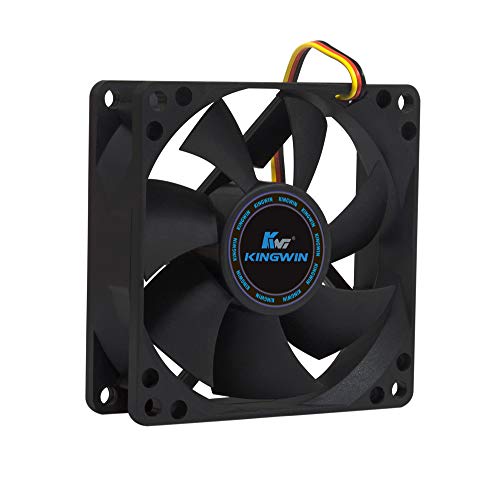
Kingwin 80mm Silent PC Case Fan
Kingwin 140mm Silent PC Case Fan
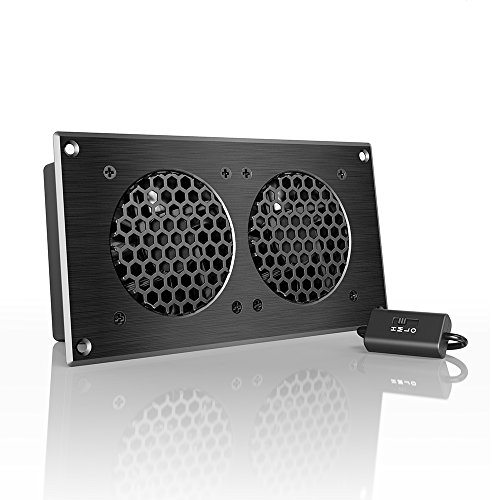
AC Infinity AIRPLATE S5 Cabinet Fan

Thermalright TL-M12QW X3 ARGB 3-Pack
Kingwin 120mm Silent PC Case Fan

AC Infinity AXIAL 8038 Muffin Fan

Wathai Dual Ball 3x120mm Server Fans
The Picks, Examined More Closely
The 80mm Noctua NF-A8 sits in a class of its own for noise-conscious compact builds. Sized for HTPCs, ITX cases, and NAS enclosures, it uses a 4-pin PWM header (a connector that lets your motherboard throttle the fan speed automatically based on temperature) so it ramps down when your system idles and pushes harder only when thermals demand it. The chromax Black finish drops Noctua’s signature beige and brown for a stealthier look that blends into dark interiors.
For home theater PCs parked next to a TV or recording rigs where fan noise gets picked up by a mic, this is the kind of swap that disappears into the background. Owners with mini-ITX cases who already chose the Noctua NF-A12 for the front panel often pair this model in the rear to keep the acoustic profile consistent.
Positive Points
- Very low noise at partial duty thanks to PWM control, ideal for living-room PCs
- Long-rated service life that commonly outlasts the systems it cools
- Compact 80x25mm frame fits tight HTPC, ITX, and NAS housings
- Dark chromax finish matches stealth and black-themed builds
Things To Consider
- Costs more than most 80mm alternatives, which may feel steep for casual builds
- Premium cooling in this size still has airflow limits in fully sealed small-form-factor cases
Who It Suits Best
Quiet-focused HTPC and small-form-factor owners who want PWM control without the typical 80mm whine.
Where Another Pick Suits Better
The Kingwin 80mm Silent PC Case Fan is a more wallet-friendly replacement for general office desktops where premium acoustics aren’t the priority.
Kingwin’s 80mm Silent fan is the kind of part you grab when an old exhaust fan rattles and you don’t want to overthink the replacement. It targets quiet operation and slots into a wide range of cases, CPU tower coolers, and modest mining rigs that still use smaller fans.
For a basic office tower or a small home server, it does the job without drawing attention. The brand has been around long enough that the long-life bearing claim isn’t an empty line, though it’s a step down from the Noctua NF-A8 PWM chromax Black 80mm if absolute silence matters to you.
Positive Takeaways
- Low cost makes it easy to swap multiple fans in older rigs at once
- Standard 80mm fit covers a wide range of legacy cases and CPU coolers
- Long-life bearing design suits always-on home servers and NAS units
Worth Noting
- Not as hushed as premium PWM fans when pushed to full speed
- Lacks the refined acoustic engineering of higher-tier 80mm options
Made For
Owners refreshing an aging office PC or NAS on a tight budget who still want a reliable quiet fan.
Consider Something Else When
You’d benefit from the Noctua NF-A8 PWM chromax Black 80mm if your build sits in a quiet room and PWM ramping matters.
Move up to 140mm and the airflow story changes overnight. The Kingwin 140mm Silent fan uses a higher-profile blade design that pushes a meaningful amount of air at modest RPM, so it moves heat without spinning hard. It’s a common pick for full-tower cases, mining rigs, and workstation builds with multiple GPUs generating serious heat.
The 140mm frame needs space, so a compact mini-ITX case may not accept it, but most mid and full towers have a 140mm mount. Owners commonly report that it keeps thermals in check on extended mining shifts where smaller fans would scream.
Advantages To Know
- High-profile blades maximize airflow per RPM, reducing noise for the cooling delivered
- Long-life sleeve bearing rated for extended continuous operation
- Drop-in fit for any case with 140mm mounting points
Trade Offs
- Too large for many small-form-factor and HTPC cases
- Not as quiet at full tilt as smaller premium models like the Noctua NF-A8 PWM chromax Black 80mm
Best Suited To
Owners of full towers, workstations, and multi-GPU mining rigs who want high airflow without paying premium prices.
A Better Fit Elsewhere
Pick the Kingwin 120mm Silent PC Case Fan if your case only supports 120mm mounts or you want a more universal size.
The AC Infinity AIRPLATE S5 is a different animal from a standard case fan. It’s a complete 8-inch cabinet cooling system with a CNC-machined aluminum frame, a multi-speed controller, and dual power options via wall outlet or USB. The brushed black finish looks at home on AV racks, network cabinets, and home server enclosures where appearance matters as much as airflow.
Home theater enthusiasts with stacked receivers, network switches, and a home server in a media closet often use this kind of plate fan to keep the whole cabinet breathing. The included Turbo Adapter boosts output when you need to clear heat fast.
Where It Excels
- Dedicated speed controller lets you tune noise to airflow for the cabinet environment
- Aluminum housing dissipates heat and resists warping over years of service
- UL-certified design adds confidence for always-on AV and networking use
Honest Caveats
- Not a direct PC case fan replacement, this is for cabinet-level cooling
- Needs clearance and a power source, so placement planning is required
Who Will Love This
Home theater and home server owners who need to ventilate an enclosed AV or networking cabinet quietly.
Look Elsewhere When
You should grab the Thermalright TL-M12QW X3 ARGB 3-Pack if you’re cooling internal PC components rather than an external cabinet.
The Thermalright TL-M12QW X3 comes as a triple pack of 120mm PWM ARGB fans, which means addressable RGB lighting that can be controlled by your motherboard software. The daisy-chain connection trims cable clutter, so builders with tempered glass cases can keep the interior clean while still getting a full lighting effect across intake, exhaust, and radiator positions.
At 2000 RPM, these spin faster than typical silent fans, and the dual-side infinity mirror look gives the blades a fuller, deeper visual. If your build lives behind glass and you want lighting and airflow in the same package, this set covers both.
Everyday Perks
- Three-fan bundle covers a full intake-exhaust setup in one purchase
- Daisy-chain wiring reduces the cable mess behind the motherboard tray
- Strong airflow and pressure for gaming rigs and radiator-mounted configurations
- ARGB lighting on both sides looks fuller through glass panels
Points To Keep In Mind
- Higher top speed means more noise at full tilt than quieter case fans
- Requires a 5V 3-pin ARGB header on the motherboard for full lighting control
Quick Facts
Perfect Match For
Showcase gaming builders and content creators who want strong airflow and synchronized RGB in a glass-panel case.
Skip It When
The Noctua NF-A8 PWM chromax Black 80mm is a better fit for compact quiet rigs where lighting isn’t a priority.
The 120mm format is the universal language of PC cases, and the Kingwin 120mm Silent fan speaks it fluently. It uses high-profile blades for solid airflow and a long-life sleeve bearing (a simple, quiet bearing type with a lubricated sleeve around the shaft) rated for up to 100,000 hours. The 3-pin/4-pin connector option means it works on older motherboards and modern boards alike.
For most mid-tower builds, this is a workhorse replacement that drops in without compatibility headaches. Compared to the bulkier Kingwin 140mm Silent PC Case Fan, this model fits where 140mm mounts aren’t available, and it’s quieter than the ARGB-equipped Thermalright TL-M12QW X3 ARGB 3-Pack at full load.
Everyday Advantages
- 120mm size fits virtually every standard mid-tower case
- Long-life sleeve bearing supports years of daily use
- 3-pin/4-pin compatibility covers older and newer motherboards
Some Limits To Know
- Not premium-acoustics tuned like the Noctua NF-A8 PWM chromax Black 80mm
- No ARGB lighting, so it won’t satisfy glass-case showcase builders
The Right Fit
Anyone building or maintaining a standard mid-tower desktop who wants a quiet, dependable exhaust fan without extras.
Another Choice May Suit
Consider the Thermalright TL-M12QW X3 ARGB 3-Pack if you want a multi-fan bundle with synchronized RGB lighting for a glass case.
The AC Infinity AXIAL 8038 is a 120V AC muffin fan, meaning it runs on the same wall-outlet current as a lamp rather than the 12V DC your motherboard supplies. The 38mm thickness makes it heavier-duty than a typical 25mm PC fan, and dual-ball bearings extend its working life considerably. It ships with a power plug cord, two fan guards, and a mounting screw set, so you can drop it into a project box, amplifier rack, or DIY enclosure without hunting for parts.
This is the right tool when your cooling job lives outside a standard PC case. Workshop electronics, AV amp replacements, 3D printer enclosures, and small server cabinets are all places where the AXIAL 8038 quietly does the work.
Reasons It Performs
- Heavy-duty aluminum frame and dual-ball bearings extend service life
- Includes power cord, guards, and screws for direct installation
- Mounts in any orientation for flexible project placement
What To Weigh
- 120V AC power means it’s not a drop-in for standard PC fan headers
- Low-speed model trades airflow for quieter operation, so verify your CFM needs
Key Attributes
Whose Shelf It Belongs On
DIY builders, repair-tech types, and audio enthusiasts who need a tough replacement fan for non-PC equipment.
Reach For A Different Pick When
The Kingwin 80mm Silent PC Case Fan fits better for a standard desktop where 12V DC and motherboard headers are the norm.
The Wathai Dual Ball 3x120mm pack arrives as three 120mm fans with AC plugs and a built-in speed knob, so you can dial airflow up or down without touching the BIOS. The dual-ball bearing design is built for continuous operation, which is exactly what you want in a basement workshop, a grow tent, a server closet, or a workshop with a hot-running amplifier stack.
It’s an unusual pick compared to the other items on this list because it leans toward plug-and-play rather than motherboard integration. If you want to ventilate a non-traditional space and keep the option to tune speed by hand, this bundle covers a lot of ground.
What Works In Its Favor
- Onboard speed knob lets you tune airflow without BIOS or software
- Three fans in one pack suit larger cabinets, racks, or split cooling zones
- Wide voltage range supports 110V to 220V power environments
Practical Considerations
- AC plug-in design doesn’t integrate with standard PC fan headers
- Larger form factor and cable runs need planning in tight builds
Built With In Mind
Workshop owners, hobby growers, and home server hobbyists who want plug-in exhaust with hands-on speed control.
Swap It Out When
You’d be better served by the AC Infinity AIRPLATE S5 Cabinet Fan for a refined AV or networking cabinet setup.
What Matters Most Before Choosing Exhaust Fans For Pc
Match The Fan Size To Your Case Mounts
The 80mm, 120mm, and 140mm options above each target different cases. Measure your existing fan mounts before buying, because a 140mm fan won’t fit a slot designed for 120mm, and an 80mm is the only option for many HTPC and ITX enclosures. PWM (Pulse Width Modulation) is the 4-pin standard that lets the motherboard adjust fan speed based on temperature, while 3-pin fans run at a fixed voltage-controlled speed. For most modern builds, 4-pin PWM gives the best balance of silence and cooling.
Think About Noise Tolerance And Duty Cycle
Home theater PCs and recording rigs need quiet fans because the system sits near your ears. A long-life sleeve bearing or dual-ball bearing keeps noise low over years of use, but premium PWM fans like the Noctua NF-A8 PWM chromax Black 80mm give the best acoustic profile. Mining rigs and always-on servers can tolerate more noise in exchange for higher airflow, where a 140mm high-RPM option makes more sense.
Decide Between Internal And External Cooling
The picks above split into two camps. Internal case fans (Noctua, Kingwin, Thermalright) mount inside a PC chassis and connect to headers. Cabinet and external fans (AC Infinity AIRPLATE S5, AXIAL 8038, Wathai) plug into wall power and cool an enclosed space around your gear. Pick the camp that matches where the heat actually lives.
Lighting And Aesthetics Count For Showcase Builds
Glass-panel cases put every fan on display. Plain black fans like the Kingwin 120mm Silent PC Case Fan disappear visually, while ARGB fans like the Thermalright TL-M12QW X3 ARGB 3-Pack turn cooling hardware into a design element. Match the fan choice to whether your case is meant to be seen or hidden.
Key Considerations Across These Picks
Mistakes Worth Dodging
Buying a 140mm fan for a case that only supports 120mm mounts is the most common error. Equally common is grabbing a 3-pin fan for a board that expects 4-pin PWM, which forces the fan to run at full speed and ruins the noise profile. Confirm your case measurements, your motherboard headers, and the airflow direction before you order.
Where The Extra Money Goes
Premium pricing on fans like the Noctua NF-A8 PWM chromax Black 80mm pays for refined blade geometry, lower vibration, longer-rated bearings, and tighter noise tolerances. The cost shows up most clearly in whisper-quiet rooms where every decibel matters. For louder environments, a value pick like the Kingwin 120mm Silent PC Case Fan delivers similar airflow at a fraction of the cost.
Frequently Asked Questions
What Size Exhaust Fan Do I Need For My PC?
Match the size to your case’s existing fan mounts. Most mid-towers take 120mm or 140mm, while HTPCs and ITX cases often need 80mm. A fan that doesn’t fit the mount is useless no matter how good the specs are.
Are PWM Fans Worth The Upgrade?
PWM lets the motherboard adjust fan speed based on temperature, so the fan idles quietly and ramps up only when needed. For quiet builds, PWM is well worth the small premium. For always-on servers that run hot constantly, a fixed-speed fan works fine.
How Long Do PC Case Fans Typically Last?
Sleeve-bearing fans commonly rate around 30,000 to 100,000 hours, while dual-ball bearings extend service life further under continuous use. Dust buildup shortens any fan’s life, so periodic cleaning matters more than the rated hours suggest.
Can I Mix Different Fan Brands In One Build?
Yes, mixing brands works as long as sizes and connector types match your mounts and headers. Many builders pair a premium Noctua at the rear exhaust with value Kingwin fans in less critical positions to balance cost and acoustics.
Do RGB Fans Cool Better Than Plain Fans?
RGB lighting adds little to cooling performance. Fans like the Thermalright TL-M12QW X3 ARGB 3-Pack move air effectively, but the lighting is for looks. Compare airflow and noise specs, not just features, when picking a fan for performance reasons.
Closing Remarks
A reliable exhaust fan setup keeps components cool, acoustics reasonable, and systems running through long sessions. Match the fan size and connector to your case, decide how much silence matters, and pick the option that fits your build’s priorities. The right fan is the one that disappears into the background while doing its job.


