

A dead card slot on a shoot is the kind of small disaster photographers know too well. You empty your bag, swap in a fresh card, and still need somewhere reliable to offload RAW files before the next session. A solid flash drive bridges that gap, sitting in your kit as a portable, physical backup you can actually hold. Picking one means balancing capacity, write speed, and how rough your daily routine gets on your gear.
The Picks In Brief

Paintechz Custom Swivel USB Flash Drives 500 Pack 2GB

SanDisk 128GB Ultra USB 3.0 Flash Drive
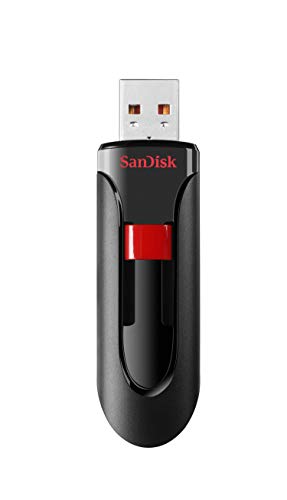
SanDisk 32GB Cruzer Glide USB 2.0 Flash Drive
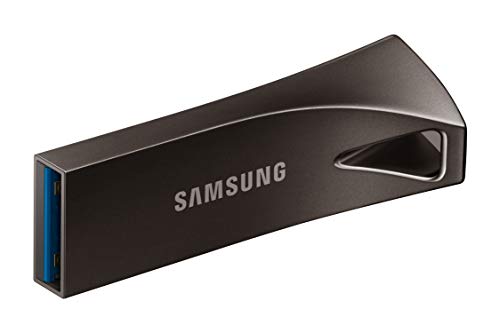
Samsung BAR Plus 3.1 USB Flash Drive 128GB Titan Grey
More Details On Our Top Picks
This pick sits apart from the others on the list because it isn’t really a personal backup drive at all. The Paintechz Custom Swivel USB Flash Drives come in a 500-pack of 2GB sticks built for branded giveaways, tradeshow swag, or client handoff kits. Each unit supports double-sided branding through screen print, UV printing, full-color application, or laser engraving, which is why studios use them for preloaded portfolio reels.
Photographers running workshops or sending sample galleries home with clients get the most mileage out of this format. The swivel shell protects the connector when the drive rides around in a laptop sleeve or messenger bag. Files can be preloaded before shipping, so the recipient plugs in and immediately sees the content you intended. Each stick runs on Tier 1 NAND flash memory, the same grade category you’d find in mainstream retail drives, helping keep read consistency across a large batch.
Useful Touches
- Double-sided printing is included, so you can place a logo on both faces without a setup surcharge.
- Multiple decoration methods let you match finishes to brand guidelines instead of forcing one look.
- Free preloading turns each drive into a ready-to-open portfolio or gallery for the recipient.
- The swivel design tucks the connector away, reducing the chance of bent pins in a packed camera bag.
Things To Consider
- At 2GB per drive, this is firmly a sample-delivery format rather than a working backup for a full shoot.
- A 500-count order is geared toward studios and event teams; solo shooters won’t move through inventory quickly.
Key Advantages
Who It Suits Best
Studio owners and workshop hosts who hand clients physical media after a session, rather than shooters looking for daily backup storage.
Consider Something Else When
You need fast personal backups between shoots, in which case the Samsung BAR Plus offers the rugged build and higher capacity this list can’t.
The SanDisk Ultra is the kind of drive that quietly does its job in a kit bag for years. With 128GB of room and a USB 3.0 interface, it moves large RAW batches faster than older 2.0 sticks without the cost jump of premium SSDs. The black plastic shell is light enough to forget you’re carrying it, and the retractable cap-free design protects the connector without a separate piece to lose.
For wedding shooters, event photographers, and travel creators, this is a dependable middle-tier option. A typical wedding day in RAW+JPEG can run 30–60GB depending on resolution and burst rate, so 128GB gives you space for a full event plus a buffer. Compared to the Paintechz bulk pack above, this is built for the photographer’s own workflow rather than client delivery. Plug it into a laptop on location and you can begin editing or sharing previews before the drive is even full.
Key Advantages
- 128GB holds a full day’s RAW capture from most mirrorless and DSLR bodies.
- USB 3.0 cuts transfer time noticeably versus the Cruzer Glide below.
- Retractable connector design keeps the plug safe in transit.
- Lightweight shell stays comfortable on a keychain or lanyard.
Worth Noting
- Plastic shell isn’t built for rough drops, so a small case helps on active shoots.
- Sustained write speeds can dip during very large batch transfers, which lengthens the final copy phase.
Made For
Working photographers who need a reliable, roomy daily backup that fits in a pocket and handles a full day of shooting.
Not Your Match When
You routinely shoot in harsh outdoor conditions, where the Samsung BAR Plus’s metal body is the stronger carry.
The Cruzer Glide is the smallest-capacity option here, and that limitation is also its strength. At 32GB it covers quick file transfers: a session’s worth of JPEGs, a stack of edited previews, or a single short video deliverable. The sliding外壳 design, where the connector retracts into the body, avoids the lost-cap problem common with older thumb drives.
This stick suits portrait and street photographers who don’t need to offload an entire wedding at once but want a tidy way to hand a client a folder of finished images. The SecureAccess software that ships with it lets you password-protect a private partition, leaving the rest open for casual sharing. Unlike the SanDisk Ultra above, it runs on USB 2.0, so it’s noticeably slower on big transfers, but for handing over 200 edited JPEGs at the end of a portrait session, that’s not a real bottleneck.
Bright Spots
- 32GB is well matched to a single portrait session or a curated preview set.
- Retracting connector cuts down on lost caps and bent pins.
- SecureAccess software adds password protection for private client folders.
- Compact body slips onto a keychain without adding bulk.
Trade Offs
- USB 2.0 limits throughput, so moving full RAW libraries takes patience.
- 32GB fills quickly during multi-day events or high-volume bursts.
Right Fit For
Portrait and street photographers who want a small, simple stick for finishing touches and client handoffs.
Look Elsewhere When
You regularly move full RAW catalogs in one session, where the SanDisk Ultra offers the capacity and speed to handle it.
The Samsung BAR Plus is the drive you grab when your kit sees more gravel than studios. Its metal casing shrugs off the kind of drops and pressure that would crack a plastic shell, and the integrated keyring loop means you can clip it to a strap or a carabiner so it doesn’t sink to the bottom of a bag. With 128GB of storage and a USB 3.1 interface, it pairs capacity with quick movement of large files.
Outdoor, travel, and adventure photographers get the most from this build. Think landscape sessions in cold weather, beach shoots with sand in every pocket, or assignment work where you don’t have time to baby your gear. Compared to the SanDisk Ultra above, the BAR Plus trades some weight for a tougher exterior and a faster interface ceiling, which matters when you’re moving 60GB of RAW files between cards at the trailhead. The compact bar shape also slides neatly into a laptop sleeve without snagging.
Real-World Strengths
- Metal casing handles drops, pressure, and temperature swings better than plastic shells.
- USB 3.1 read speeds up to 400MB/s shorten the wait on large RAW dumps.
- 128GB comfortably covers a full multi-day landscape trip or assignment.
- Integrated keyring loop keeps the drive tethered to your kit.
Points To Note
- Metal body adds a little weight compared to plastic alternatives.
- No cap means the connector is exposed when unclipped, so a small pouch helps in dusty environments.
Feature Snapshot
Whose Shelf It Belongs On
Outdoor, travel, and adventure photographers who need a durable backup that holds up to weather, drops, and frequent handling.
Reach For A Different Pick When
You mainly work in controlled indoor settings, where the SanDisk Cruzer Glide covers smaller handoffs at a lower cost.
What To Weigh Before Picking Flash Drives For Photographers
Capacity That Matches Your Shooting Volume
The first thing to sort out is how much space a single drive needs to cover. A portrait session might finish well under 10GB, while a wedding or a multi-day landscape trip can easily push past 60GB in RAW files. Choosing a 32GB stick for the latter means you’re swapping drives mid-shoot, which is exactly the disruption photographers try to avoid. A 128GB stick is the comfortable middle for most working photographers, while a 2GB unit only makes sense for curated client samples or marketing deliverables.
Read And Write Speed In Real Shoots
Speed matters most when you’re moving big batches between cards and a laptop, and it splits into two numbers. Read speed controls how fast files load from the drive, and write speed controls how fast they land on it. USB 2.0 drives are fine for sharing finished JPEGs, but a USB 3.0 or 3.1 stick makes a real difference when you’re offloading gigabytes of RAW files after a long day. Faster interfaces also shorten backup time, so you spend less time tethered to a laptop and more time shooting.
Build Quality For Your Shooting Environment
A studio shooter who carts a drive between two rooms doesn’t stress durability much. A landscape photographer bouncing across a trailhead or working at the coast does. Metal casings, integrated keyring loops, and sealed connector designs all add resilience when your gear gets knocked around. Match the build to your routine: a rugged stick earns its weight when your bag sees weather, dirt, or constant handling.
Connector And Port Compatibility
Most modern laptops carry USB-A ports, and almost every drive on the market still uses that connector. Newer ultrabooks and tablets often drop to USB-C only, which is when you’ll need an adapter or a different stick altogether. Photographers moving between older desktops and newer MacBooks benefit from carrying a small adapter kit, so the same drive works whether the destination has a square port or a slim oval one.
Key Considerations Across These Picks
Common Shopping Slip Ups
Plenty of shoppers grab a flash drive based on capacity alone and forget about speed. A 128GB stick on USB 2.0 sounds fine until you’re waiting through a 40-minute RAW transfer after a wedding. Equally common is buying a fragile plastic stick for outdoor work and discovering too late that one drop cracked the connector. Match the interface to your file sizes, and match the casing to where you shoot.
When Paying More Pays Off
The jump from a basic plastic stick to a metal-clad USB 3.1 drive looks steep on a price tag, but the math changes once you factor time. Faster transfers mean less waiting between cards, and a rugged body means you’re not replacing the drive every time it takes a tumble. For photographers who depend on their gear every weekend, that durability and speed is the difference between a smooth workflow and a frustrating one.


